Categories
Reviews

Managing Files Easily on Your iOS Device – iFile Download Manager

App Name: iFile Download Manager

Developer: Beleela

Price: $0.99 USD

Market Link: iTunes

One of the major reasons why I have an iTouch5 is so that I can easily surf the web, deal with social media, and work on my sites when I on the run. Recently I have been away from the
desk more and more, thus I find myself bookmarking, downloading, and taking notes on my mobile devices.

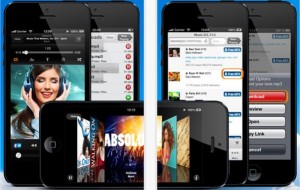
iFile Download Manager is a very convenient app to have when you are working on your iTouch, iPhone, or iPad. The app is gives the ability quickly and easily deal with almost any type of file you might deal with online.

The app is setup with two menus, one on top and one on the bottom of the screen. The top menu has the various options when dealing with individual files such as:

Switch levels / Cut / Copy / Clipboard / Delete / Email / Search

The bottom menu deals with more of the file setup:

Local– list of files on your device
Dropbox – list to files in your Dropbox account
Browser– Convenient  link to surf the Web within the app
Downloads – list of files currently downloading
Settings– link to online help manual, etc

The app is pretty straightforward but it does come with a sample folder and files so you can get an idea of how the app works and “practice.” You can create, edit, and delete folder and
subfolders to organize your files. You can import photos and even create zip files.

The app also is universal and can be used in both portrait and landscape mode.

Two features I really appreciate with the app are the ability to link it with my Dropbox account and the ability to integrate with Safari directly with its custom bookmarklet. Another
service that I think would work well with iFile Download Manager is Evernote. I would be curious if the developer had thought about it.

I am pretty amazed at what all this app can do. You can monitor any files you might be downloading, read, cut/paste, share Word docs, pdfs, and even listen to mp3s.

So if you need help organizing and dealing with files on your iOS device, then I would give iFile Download Manager a try.

Just found out that this weekend (1/18/2013), the developer is have a Special Offer of 75% OFF for this weekend only. SO you can get the full app for only $0.99 USD!


Categories
Reviews

Protecting Your Galaxy Note 2

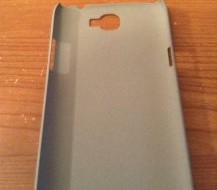
One of the first things I wanted to do with my new Samsung Galaxy Note 2 was get a cover on that bad boy. It is a beautiful phone but I wanted to protect it. Since it is already a large phone, I wanted to get a case that did not add to much bulk to the Note 2. After doing some searching for Galaxy Note 2 cases at MobileFun, I chose: Ultra Thin Textured Hard Case .

The case is very easy to put on, it simply snaps into place. It provides protection for the entire back and the corners. The case also adds to texture to the back of the phone making it actually easier to handle. Overall it is a very nice case and a worthwhile investment. Look for other case reviews coming in the near future.


Categories
Reviews

Battle Alert – Red Uprising [Android Game Review]

App Name: Battle Alert – Red Uprising

Developer: Empire Game Studio

Cost: Free

Market Link: Google Play

Review:

If you enjoy real time strategy games (RTS) and player vs player (PVP) game, then Battle Alert – Red Uprising from Empire Game Studio should be one you try. Battle Alert has been on iOS and is now on Android. After playing the game a while, it reminds me a lot of Clash of Clans. You can see my review of it over at PocketFullofApps.

The premise of the game is very simple. You are tasked to build the best fighting force possible and then complete missions and/or attack and hopefully defeat other human players. In the market they call it a “combat mixed tower defense and strategy” which I guess is somewhat accurate as you need to setup defense around your camp so if you are attacked by others you are prepared.

The layout of the game is very straightforward. They have designed the game so the buttons do not take up a lot of real estate. There is also pinch to zoom so you can easily focus in on your units or buildings.

When you first start, you will work on a tutorial mission to help you figure out what to do. If you have played these types of games before, you should not have a problem. After you are done that, then you are presented with more missions which you will need to complete to coin and oil to help build your forces.

Also when you first start you will be given newbie protection so you can get yourself settled before others can attack you in the PVP seciton.

The game is free to play but there are in app purchases you can make for game cash, which can be used to purchase in game resources. As you play, you will earn some
game cash which you can use to purchase protection time, resources like metal, oil, and base.

In the game, you are build 3 different types of units:

  • Resource Buildings- oil, metal storage and extractors, and power plants
  • Military – academy to build more troops, and more
  • Defense – walls, missiles, gun turrets, etc

With every thing you purchase, you can upgrade them.

Overall the game is fun and the graphics are pretty good. To move soldier(s), simply highlight them and then tap to move. When you tap on them, they call out and really reminded me of StarCraft. The game seemed to play well but I did had some lag at times but was not sure it was the game or my Internet. You will need Internet to play the game.

As I mentioned the game is very much like some others, which is not a bad thing. I am not a big PVP gamer simply because I always seem to get my butt kicked. LOL. But the game does give you a lot to do so it is a good game to play for a while, put it down and then come back to it. So if you enjoy RTS games, they download Battle Alert and see if you could build a better army then I did.

Categories
Reviews

Having Fun Playing Slots Social Casino [Android]

App Name: Slots Social Casino

Developer: Playport

Cost: Free / in-app purchases

Market Link: Google Play

Review:

If you are a social person and enjoy casino games then Slots Social Casino might be for you. I have played a number of social casino games and most cover have similar features. From the
copy of Slots Social Casino that I evaluated it appears that the developers will be adding quite a bit more games to the line up. This game focuses on slots and poker games.

As the title mentions the focus of the game is social. When you first enter the game, you can play as a guest or setup your own account/player name. Now the game is free but to play you
need chips. You can earn chips by playing or via in-app purchases. If setup an account, you get 1000 chips and another 1000 chips if you add a photo to your account.

After setting up your account, you will want to spend a bit of time getting familiar with the game layout.

  • Shop, you have the following options:
    -Lucky time – purchase chips, lucky time and VIP bonus
    -Chips – purchase chips, a bonus and VIP bonus
    -Free chips
    -Winner Shop
  • Rankings – see how you are doing
  • Friends – list of your in game friends
  • My Page– is a nicly setup profile page of your winnings, messages, gifts, etc
  • Collect Bonus – In this section you can get collect a bonus every six hours. Again focusing on the social aspect of the game, you can get more chips by getting followers, write a review,and invite friends to play.

Now to the games. There a nice selection of them and as I said more are on the way. Each game will be locked until a certain level and has a minimum bet and action. The first game you can play is Treasure Island with a minimum bet of 25. Note: You will need to download each game to play. After that the games available at this writing are:

Stone Age
Gangsters Pocker
Golden Fruits
Ranch Story
Fairy Garden
Magincal Spin
Shining Stars
Head Butt
Halloween Party
Money Feve
Western Ranch Story
Aquamarine-
Stone Age2

Overall the game seems to play well. The graphics are well done and I did not experience any glitching. Playing the game by yourself is fine but you will probably enjoy it more with others. Another point I should make is that this game if for fun, no real money won here.

So if you want to have some fun and not worry about losing money, give Slot Social Casino at try. Below is their video overview of the game. There is no sound but should give you a nice idea on how it runs.

Categories
Reviews

Free Music Download Pro Plus for iPhone, iTouch

App Name: Free Music Download Pro Plus – Downloader and Player

Developer:

Price: Free / $0.99 USD

Market Link: iTunes

Review:

One of the great things about iPhones, iTouch, and mobile devices in general is that you can easily download, manage, and play your favorite music. I like a lot of  different types of music and am always on the look out for cool new songs or some of the classics. I recently downloaded a new app on my iTouch 5, “Free Music Download Pro” – Free Music Downloader and Player and was pleasantly surprised at it. It took me a few minutes to figure it out but once I did, it was pretty good.

Now the app does comes in two versions Free and a Pro version for $0.99 USD, so you can try it before you buy. The Pro version allows for unlimited music downloads and ability to transfer to PC/Mac/Ipod library. This app is designed to help the music aficionado find free and legal songs online.

The app is basically a specialized Internet browser where you can browse, download, and even play music. When you first open the app you are presented with a very detailed screen with everything you will need to know to get the most out of the app. The sections are:

  • Download – how to info
  • Transfer – how to info
  • Troubleshooting – info on some common problems
  • Other – a few miscellaneous items

Forgot to mention that the app comes in 12 languages too.

After you have familiarized yourself with the app, it is time to start downloading. At the bottom of the screen you will find the app main menu.

Browse – In app Internet browser
Downloads– a listing of your songs (mp3, m4a and wav formats)
Files– a list of your video/songs
Playlists– as was mentioned earlier, this app is also a player so you can create and save playlists in the app
More – this opens a new window with a number of others options :

  • Songs
  • Artists
  • Albums
  • Videos
  • Settings – Within this section you can modify a ton of options for the app. This is a very important area for those that like to customize how the app works. I think this should be located on the top menu.

Overall the app is well done and very useful. As I mentioned earlier, after I did some reading, I had a good handle on how it works and what to do. I like the idea of any app that will help me find the free songs online. So if  you looking for an easy way to find free songs online, then you should give Free Music Download Pro Plus a try. Happy listening!

If you would like to try the free version first, you can get it here on iTunes.

Categories
Reviews

WorldCard Mobile [iOS] – Business Card Scanner

worldcard

For those that have a lot of business cards, WorldCard Mobile should be an app to consider. This is an award winning business card scanning application for iPhone, uses OCR (Optical Character Recognition) technology to instantly transfer information from business cards to your contact list. When you first turn on the app, you it will ask you to connect with your contacts. Within the app itself, there is a very simple menu system:

  • Card Holder: This shows all of the cards/contact information
  • Camera: Where you go to scan the business card
  • Photos: Where you can create a contact from albums
  • Signature: Where you can copy email signatures
  • QR Code: A QR code scanner

Within each of these areas, there are a number of options and settings you can adjust. I found the app very easy to use. There is a nice help section within the app if you need more specifics on things. If you do a lot business meetings and swap business cards, I see this being a real time and space saver.  Check out the demo video below for more information on the app.


Categories
Reviews

Keeping Up with the Markets – MetaTrader 5 for Android

App Name: MetaTrader 5

Developer: MetaQuotes Software Corp.

Cost: Free

App Market: Google Play

Review:

The greatest thing about Android smartphone is that you have it with you all the time. It is wonderful to be able to check the scores, order movie tickets, get directions, or check your emails. Well for the investor it is important to keep up with the market. MetaTrader 5 for Android, is an app that allows you to trade in the Forex and Stock markets or monitor your account and trading history.

MetaTrader 5 by MetaQuotes Software Corp is a B2B software development company established in 2000. MetaTrader was first developed for the PC and was ported over a few years ago and was well received in the financial circles. MetaTrader5 is the newest version of  that software and has been completed updated. If you have an iOS device, there is a iPhone version of the app also.


The app is very easy to use. When you first open it, you will be given the option to log in to an existing account or create a demo account to see how it works. The interface is very clean and simple to navigate. The main tabs are

Quotes — prices of financial instruments
Charts — price charts
Trade — state your account, can also manage trade positions, pending orders
History — trade history

Within the app there are a number of settings you can adjust such as line types, show volumes, show trade levels. The app has push notifications that can be used. This is the reason why this app has been successful- it is built to do one thing and do it well. No extra fluff.

For traders, who trade on the Forex and Stock markets, the app provides a very convenient way to keep track of accounts. Not sure if I mentioned this but this app will connect to your MetaTrader5 account on the PC, so no need to enter things twice.

Another great aspect to this app is their website. MetaQuotes Software has put together a very informative and helpful site for beginners.

If you are active traders and would like a way to keep track of your strocks or actively trade on your Android phone or tablet, MetaTrader5 should handle your accounts easily.


[social-bio]