Categories
Products

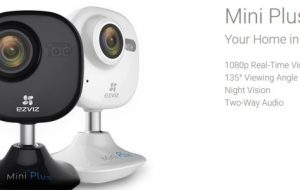
EZVIZ Mini Plus Wi-Fi Camera Review

Home security and video monitoring are very important topics to most home owners. There are many different products and services on the market to choose from. Today I am looking at the Mini Plus Wi-Fi Camera from EZVIZ. I need to thank the manufacturer for providing a unit to test for this post.

If you ever wanted to set up your own home monitoring system or setup a video chat system, the Mini Plus Wi-Fi Camera can do the trick.

As stated in the video, the unit is pretty easy to setup, as long as you follow the instructions. 🙂 The developer’s website does a very good job providing you with the basic information, so I am not going to repeat it.  Here are some key points I wanted to highlight:

  1. Your can control the camera via a mobile app but they both must be on the same Wi-Fi network
  2. The unit is small but is not battery operated, so you need to have it plugged in. (You do get a pretty long cord included)
  3. You can save your video/images via the cloud or microSD card (not included)
  4. You can control multiple EZVIZ devices from one app

The camera video and screen resolution are excellent and the lighting worked well. Since there are not a lot of “moving” parts with the camera, it is hard to “mess” up. Once you have charged, positioned, and put the camera on your Wi-Fi network, everything you will need to do can be done within the app.

Once the app is installed, you will need to setup an account. This will be used of course to connect to the cloud and for settings. It should also be noted that to use the cloud there is an additional charge involved. In addition to setting up the cloud, within the app you can:

  • Setup your notifications, sounds, device parameters and configure the Wi-Fi
  • Access online help
  • Work with IFTTT

For those not familiar with IFTTT, this is an applet that allows you connect 2 apps together to perform a function. So within this app, you can turn on Sleep mode or have the WeMo on when motion is detected or you can setup your own. A pretty neat feature to have.

When you access a particular camera in the app you will be able to do a number of things such as:

  • Turn on/off the mic
  • Take a still  shot
  • Record a video
  • Connect to CloudPlay
  • View previous videos
  • Zoom in in a video
  • Create a panel view
  • Flip the image

The app interface is very intuitive so you should not have any problems figuring out what to do. The test images and videos I did were clear and well defined. The camera does have a wide angle so you can see quite a bit within the field of view.

I would think the primary use of this camera is for security. You can set when and how you record and you can save quite a few videos within the cloud. You could use the camera for video chatting since there is a mic and you can also save videos and watch them later. There are some easier and less expensive options so I would think that this is not as popular.

So what are my final thoughts?

EZVIZ Mini Plus Wi-Fi Camera is a nice camera and has a very well done app to support it and allow you to have your own video security system. The price seems reasonable compared to other cameras on the market. There are quite a number of options you can customize within the app to really create the system you want. I had no problems setting up and using the EZVIZ camera. So if you are on the market for a security video system you can control on your phone, then the products from EZVIZ are a good choice.

ezvizmini

Download App (Android):

EZVIZ
EZVIZ
Developer: EZVIZ Inc.
Price: Free
Categories
Products

EaseUS Data Recovery Wizard [Product]

Today I am looking at some new software EaseUS Data Recovery Wizard.

Since we are now in the digital age, we need to deal with our electronic data and saving storing and protecting it. Being able to recover these files, when accidents occur is critical.

Details:

Name: EaseUS Data Recovery Wizard
Developer: EaseUs
Cost: Free Trial / $69.95 USD Windows, $89.95 USD (includes lifetime updates)
Description:

This software is definitely for those that have lost data or want to try and protect themselves from losing valuable data. I have lost quite a bit over the years from bad USB drives, dead hard drives, etc. Now some of that data I was able to recover but not all of it. It should also be stated, that I also did not have any quality tool or software solution such as this one, when I had my data loss.  From my experiences, if I had EaseUS Data Recovery Wizard, it would have made my life a lot easier.

So what are the key features of this software? It can help recover data that was “lost” due to:

  • deletion
  • formatting
  • damaged hard drive
  • operating system crash
  • partition
  • virus

It can be used with:

  • Hard drives (internal, external)
  • USB drives
  • Memory cards
  • Music players
  • Mobile devices

Now the process or software is pretty simple to use. Once you have it up and running, you choose the file type(s) you want to scan for, choose the location, and begin the scan. Once the scan is done you can preview and decide which files to recover.  The EaseUS website provides quite a bit of support and information on this and all products so if you have questions, you should be able to find an answer.

Data Recovery Software is sorta like insurance- it is something you should have but hope never to use. If you have been looking for a data recovery tool, give EaseUS Data Recovery Wizard and let me know how it works for you.

Categories
Products

iSkysoft Data Recovery [Product Announcement]

Have you ever lost anything? Sure you have. Probably one of the most frustrating things to lose is computer files, whether it be a document, photo, video, etc. I have lost my fair share of them.

Today I am looking at iSkysoft Data Recovery. This is a program for your PC or Mac. It comes with a free trial,so you can try it out before you pay.  It comes with two options, a one year license or a lifetime one.

Now you might be asking, why am I covering PC software on a mobile site. 🙂 Well you can use this program to help recover files from your phone, SD, SIM card too.

The program is broken up into four sections:

  • Wizard Mode Recovery
  • Lost File Recovery
  • Raw File Recovery
  • Partition Recovery

-Wizard Mode is a quick file recovery option; just answer two questions and the program will do the rest.

-Lost File is a bit more robust option, this will help you recover files you deleted from the recycle bin, file corruption, etc.

-Raw file is similar to the Lost File option but will scans over the logical structure and not your folder structure.

-Partition will scan for deleted partitions and recover them.

Overall this program is easy to use. Each section will walk you through the steps, and pretty much do all the work for you. You have a lot of control over which files to recover or ignore.

For those that need more help, there is plenty of guides and videos from the developer to help you out. I really appreciated the videos they have made; they definitely help. You can check out their YouTube page for more examples.

iSkysoft Data Recovery can be a very handy program. It really makes the process of finding and recovering lost or deleted files very easy. With four different ways to recovery files, this is a program that with just one use would pay for itself.

Head over to their website, check out the videos, or download the trial version and see if iSkysoft Data Recovery can help you.

Categories
Products

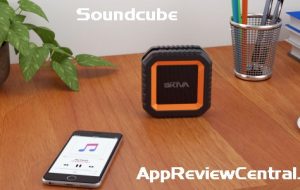
SoundCube Waterproof Bluetooth Speaker

Product Launch (Press Release):

Skiva SoundCube speaker comes with a beautiful compact design to enhance your indoor and outdoor music experience. It combines the best in class electronics and speaker driver to create
incredibly rich and loud sound. SoundCube has IP65 splash proof exterior that protects itscomponents from splashing water and dust. With SoundCube, you can enjoy the blissful music
experience at beach, pool, home, office, gym, cycling, climbing, camping, hiking or fishing without compromising quality.

This little speaker can deliver awesome power from its 5 Watts acoustic driver. 2200mAh rechargeable battery is built-in to provide 12+ Hours of Endless Music (at 50% Volume). It
enables easy pairing with Bluetooth devices and also plays all audio devices through 3.5mm Aux-in cable. SoundCube makes your music world simple but fabulous.

For more details, see the Skiva website.

SP104_01

Categories
Products

Now on Kickstarter – The Superbook

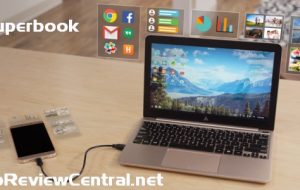
Today I want to bring your attention to a neat, new Kickstarter Project: The Superbook.

The Superbook is essential a laptop shell that you to hook your Android device to it.  Your Android device then powers the SuperBook, essentially creating an Android laptop experience. This probably is not the best way to describe it, so just watch their video.

The key to this is the Andromium OS, which you can find in the Google Play store here.

This looks to be awesome. Last year I backed the Remix Mini which is also pretty cool, allowing you to have a mini Android computer. Unfortunately they recently ran into some trouble with Google and us users are waiting to see how it all turns out.

General Specs of the Smartbook:

11.6″ LCD display at 768p
USB Type-C port
Supports Type-C and Micro-B smartphones
8+ hour battery life
Simultaneously charges smartphone
QWERTY keyboard (Android OS layout)
Android-specific navigation keys (Home, Back, Menu, Recent)
Multi-touch trackpad
Smartphone Minimum Requirements

This project has been out a few days  already and has raised over $600K, (they just wanted $50K), so it looks like it will be a reality. Shipping is estimated to be February 2017.

Google announcing earlier this year that they are updating the Chrome OS to allow Android apps to run on it. This is also great news but that would mean you needed to purchase another device. With the Smartbook you can connect it to multiple devices and will update as your device does. I think overall the Smartbook will be a bit more flexible- this depends though on their Andromium OS.

So are you interested? Check out the Kickstarter project today.

Categories
Products

UTICO App-Controlled Camper Van [Product Review]

As a kid I loved playing with Lego building blocks. As an adult I love playing on my phone. Well with UTICO App-Controlled Camper Van you can do both. 🙂

I recently tried out the UTICO App-Controlled Camper Van, compliments of MobileFun.co.uk.

When you open the box you get the base of the van, a dongle which is connected to your phone via the earphone jack, and then a bag of building blocks. The base and dongle need to be charged for about an hour each before use.

van1

Now it should be noted that these are not Lego blocks. The bricks are actually quite smaller than the popular building block, so they are not interchangeable. The van does come with directions on how to build the van but you could probably edit it some if you like. It would have been cool if they were Lego size but that is life.

Once the van is built, you will need to download the app (Android or iOS) and install it on your device. For this review, I tried the app on my Android phone.

van2

Once the app is installed and the dongle is connected to your device, turn on the base of the van and start driving. The app gives you on screen controls to steer, accelerate and brake the van. Overall this is a cute design. I enjoyed goofing around with it but this is definitely one for the kids. If they took some time and created another type of car and a city to go with it…

I had my son work with me and he had no problems following the directions in making the van or controlling it via the app.

So if you are looking a neat technology related gift for the kids, the UTICO App-Controlled Camper Van is definitely a good choice. It currently retails for about $60 USD.  For more details on app, see the video below.


The box:

van3

Categories
Products

Mad Catz C.T.R.L. Mobile Gamepad [Product Review]

Smartphone and tablets are great for being productive but if you see from my site and lots of others online, gaming is best! In today’s product review, I am looking at Mad Catz’ C.T.R.L. Mobile Gamepad. Need to provide a shout out to MobileFun for providing a review copy of the gamepad.

Mad Catz’ C.T.R.L. Mobile Gamepad comes in two versions, one for Android and one iOS. I am reviewing the iOS version. Now the gamepad connects to your device via Bluetooth so setup is a breeze. if you have ever setup a Bluetooth device, you know what to do.  Overall I found the gamepad to be sturdy and well built. It is just like the gamepad you would use for PS2; its has 2 joysticks, 1 arrow pad, and the standard X,Y,A,B keys along with R1, R2, L1, L2 buttons on the top.

Once you are connected via Bluetooth, you are ready to play. This gamepad also comes with an adapter so you can hold your iPhone or iTouch.

gamepad2

gamepad1

One of the big thing that needs to be pointed out is that not all games will work with the gamepad. There are over 800 games for the iOS version but a lot less for the Android. Mad Catz has a complete list up on their website – iOS Games, Android Games.

There are a ton of great games on the list like FIFA Soccer, Star Wars, Minecraft, and more. My son decided to test the controller with the game Terraria. He reports it works fine and that you can use the on screen controls if you want too. It took him no time at all to set it up and get gaming.

The Mad Catz’ C.T.R.L. Mobile Gamepad really gives you the game console feel while playing on your mobile device. If you are a big gamer, I definitely can recommend this investment. Now before I sign off, I want to have you look at this page on their website – GameSmart or check out the video below.

You can connect your mobile device via an HDMI cable to your large screen TV and boom you are really in business!

If you looking to snag one of these ($49 USD), head over to MobileFun’s website for more info or subscribe to our newsletter for a chance to win one for free!