
Categories
Products

Remix Android Computer

Ever wanted to have a computer based on the Android operating system and not cost you a ton of cash? Well the folks over at Jinx had a Kickstarter campaign last year for Remix Mini. I got my awesome mini a few weeks ago and all I can say is wow!

The device has WiFi, Bluetooth, LAN, 2 USB connections, HDMI output. When you first get it you will need a USB keyboard and mouse. Setup is pretty straight forward. You will need to log in with your Google Play account and you are pretty much ready to go.

They have develop a very “Windows” like environment – basically a shell placed on top of Android 5.1. The big thing to understand is that this is not a finished projected. Not all apps will work well since this operating system is still being worked on. I have had quite a few updates since I started playing with it. Now this is not to say you should not get it nor it is poorly designed. This system is still being developed and refined but so far I am pretty impressed.

I love the device and enjoy “working” on my Android computer on the big screen of my family room 42” TV. All of the apps and games that I have tried have worked pretty good. The only thing I did not like was Netflix. The resolution and playback were not very good. Right now I am not sure if it my TV, WiFi, the app or the device..

I plan to use this computer to play games, social media, some word processing etc. I see this as the Remix Mini as a computer I can take with me on vacations or trips. I purchased a Logitech Wireless Touch Keyboard k400 to use on the device and again works great.

Just recently they came out the ability to run Remix OS off of a USB drive on both PC and Mac computers.

I am very curious to see where the Remix OS and these devices will go. I can easily recommend this computer but you need to understand it is not a truly finished product. There is a lot of potential in this. Check out some other reviews/articles on the device.

Jide Remix Mini Android Desktop PC Review: Interesting Software Let Down By Bargain-Bin Hardware

The $70 Remix Mini is a great Android PC, but don’t get carried away

The $70 Remix Mini is a great Android PC, but don’t get carried away

Android running on a Mac: Remix OS 2.0 overview [Video]

Categories
Products

Skiva AudioFLow BigSound S-1 [Product Review]

If you enjoy listening to your music or watching movies on your mobile device, I bet you are not satisfied with sound. I know I am not. In today’s post, I am reviewing Skiva AudioFLow BigSound S-1.

Skiva AudioFLow BigSound S-1 is a nice bluetooth speaker that is easy to use and provides some great sound. I have tried a few different speakers with my mobile devices but right now this speaker from Skiva is probably my favorite. Why? Well read on.

The size and weight of the speaker are nice and make it easy to carry around. One of the first things I appreciated about the speaker is that is comes with a nice printed user manual. Not many speakers do.

The next thing I like that the speaker has a small indicator light, that change colors to indicate when you need to charge it.

In addition to Bluetooth connections, the speaker has an AUX pairing so you can connect a laptop or phone directly.

Finally with most Bluetooth speakers, you can connect your phone and answer calls through it. Again you can do this with the Skiva. I tried it and the call quality was very good.

I found the speaker to provide a nice sound quality, not a lot of bass but still much better than the phone speakers. The sound carried well and I could clearly hear the music from across the room and even a few rooms away. The price is reasonable when compared with other compatible products.

Some general specs:

  • 15 W
  • 3000 mAh rechargable battery
  • comes with USB cable (no wall plug)
  • has NFC pairing (could not test this based on the phone I have)
  • Volume control buttons
  • Dedicated phone answering button

Well this should give you a good idea about this speaker-well designed and works great. So if you are looking for a quality Bluetooth speaker, I can recommend the Skiva AudioFlow BigSound S-1.

For USA Customers : http://www.amazon.com/dp/B00RI9L514
For International or USA Customers : http://www.skivatech.com/sp101

Categories
Products

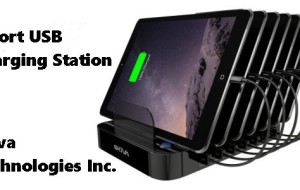
Product Review – Skiva 7 Port USB Charger

If you are like me, you have a ton of electronic devices and they always seem to need to  be charged. I have plenty of cables but not enough plugs or chargers at times. Today’s product review I am looking at a 7 port USB Charger from Skiva.

usb7port1

This charging station allows you to charge up to 7 devices via USB at one time. The base is very sturdy and well made. Most mobile phones and tablets should not have any problem sliding into the various slots and I did worry about the station tipping over at anytime. It should be noted though, if you have a case on your tablet, you might need to remove it before charging.

The station does not cover with USB cables. Once your devices are connected, there is a convenient button  on the base to turn it on and off. I found the station charged my devices with no problems. I cannot say if they charged faster or not on the station vs in the wall.

The station does make help with space. When you have lots of devices, being able to plug them into one unit, thus one plug in the wall is nice. There have been many days where I have a phone on my desk charging, tablet on the floor next to me, and another one down the hall (all due to limited wall outlets).

usb7port2

One question I had was, “would I take this on a trip?” Right now, I am not sure. When traveling I do try to limit the number of devices and cables/chargers and this station is not really travel size.

Overall I really like the station. It makes it easy to just setup and leave and then when myself or someone in the family needs to charge a device, it is ready to go. It will cost you about $59.99 USD. Depending on your budget, this might be a bit high but if you have multiple devices, you will not need to purchase anymore wall chargers. For US customers you can pick it up via Amazon and for international customers, you can get it off of their website.

For those who are interested, here is a SmartCharger Technical Specification (pdf) and a promo video:

Categories
Products

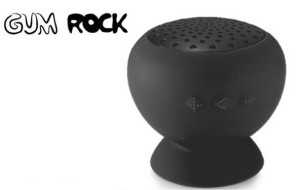
Gum Rock – Fantastic New Speakers

If you are looking for a cool and different type of bluetooth speaker for your Android or iOS device, why not give the Gum Rock a try?  Need to give a shout out to my buddy Matt at MobileFun who provided the speaker for this review. Make sure to check out the Gum Rock  product page and also their general bluetooth speaker category page.

I have been looking for a good bluetooth speaker and I must say that the Gum Rock fits the bill. From the photos below you can see this speaker is not too big and is the perfect size for the frequent traveler. The bottom of the speaker is a suction cup so it sticks almost anywhere.  I had no problems connecting the speaker to my devices and the sound quality was very good. The only negative about the speaker was that I could not control the volume of from the speaker itself. I could change tracks but not volume.

Again the Gum Rock Speaker are a neat, easy to use and travel with speaker with very good sound quality!

gum1

gum2


Categories
Products

Cool Little Keyboard for the iPad Mini [Review]

One of the neat things about tablets, specifically the iPad is the ability for it to replace the PC. Yes it cannot do everything the PC can but it is close. Today I am reviewing a neat little Bluetooth keyboard for the iPad mini.  Keep an eye out for my note taking apps for iPad coming soon.

This the Aluminium Bluetooth Keyboard Stand For Apple iPad Mini from MobileFun.com. Now there are more expensive keyboards out there but for those looking for an inexpensive and easy to use Bluetooth keyboard, you should consider this one.

It is a no-name brand and the directions are not well written but it does what needs to do. All you have to do is turn it on, pair it with you iPad mini and type. I found it very easy to type on and not hard on the wrists.  When you are not using the keyboard, the iPad mini just clips in to it, face down, so it can act as a case. Very handy for traveling.

The keyboard has all of the traditional shortcuts, if you need some more info checkout this site.

keyboard1

keyboard2

keyboard3

Thanks to MobileFun for providing the keyboard and make sure you check them out for more iPad mini accessories. 

Categories
Products

Protect Your iPad Mini with this neat Case

tabletwear


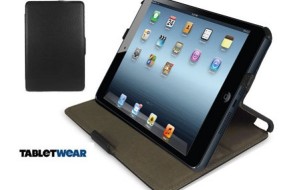
If you have an iPad, iPad mini, or an Android tablet, you are going to want to protect it. Soon after I got my iPad mini, I went in search of a case/desktop stand for it. Over at MobileFun.co.uk, I found this neat case:  SD Multi-Angle Auto Wake / Sleep Slim iPad Mini Case – Black.

This case provides total protection for your iPad mini. The iPad mini slides easily into the case and then flips over and locks in place to protect the screen while not in use.  The case does not add a lot of bulk to the device and it easily opens and converts to a desktop stand.

case2 case1

The one negative about the case is the auto wake/sleep aspect of it. A small magnet is located in the front panel of the case and it appears the location of the magnet does not active the auto wake/sleep component. I  think it is probably just this case but, it had to be noted.  All ports and buttons on the sides of the iPad mini are easily accessible.

Overall I like the case and do recommend it, plus it is reasonably priced.  If you are looking for a case/deskstand, head over to MobileFun for more iPad mini accessories.

Categories
Business Productivity Products

WorldPenScan BT [Android App and Hardware Review]

App Name: WorldPenScan BT

Developer: Penpower

Cost: App (free) / hardware ($199 USD)

Market: Google Play

Review:

From the company:  With WorldPenScan BT, you can scan information on any printed text including books, newspapers, flyers, and magazines wirelessly and easily get them translated into any foreign language with mobile devices or PC. No need to type anymore. You scan documents anytime, translate and share information anywhere. All data can be transferred into Win/ Mac or Android phones/ tablets with Bluetooth. It recognizes bar codes, OCR-A, OCR-B and MICR to apply in banks, libraries and logistics, etc.

For Android phone/ tablet users,
WorldPenScan BT can recognize more than 20 languages used most often such as English, French, German, Italian, Spanish, Traditional Chinese, Simplified Chinese, Japanese and Korean, etc.

WorldPenScan BT, wireless portable pen scanner and translator is a handy and very useful tool for businesses and individuals. I recently received one of these pen scanner to try out and I must say I was impressed. The app is free on the market but you will need to purchase the hardware separately and it is not inexpensive.

When you get the pen scanner, it comes with a USB cable and the program and drivers needed to install it on your PC or Mac. With this program you can scan directly to your computer (via the USB cable) or scan to your Android device. Since this is an mobile related website, that is the only aspect of the WorldPenScan that we evaluated.

When using the pen scanner with your Android device it connects via Bluetooth.  Setup is very simple and takes no time. There are instructions in the box that tell you how to connect via Bluetooth.  Just as a side note, there are a number of other products Penpower has and they look interesting also.

Once the pen is connected via Bluetooth and you have installed the app, you are ready to go.  To begin you will need to turn the app on, make sure it “sees’ the pen. To scan the text, simply hold the pen down over the text, making sure the scan button is depressed and touching the page. Once in place, a white light from the pen will appear. To scan, move the pen over the text. When you are done, the text will appear in the text box in the app.


The pen itself is very light and easy to hold. Ok now that we have looked at the pen itself, what about the Android app? The app itself has some nice options. You can create bookmarks with your scanned items, view your scan history, and even do voice recording.

The app can be setup to account if you are right or left handed! The app has dictionaries you can download and the ability to translate text to various languages, thus the term worldpenscan.  Finally you can easy share the items you scan.


To wrap it up. WorldPenScan BT from Penpower is an easy to use and lightweight scanning tool that makes it easy to scan portions a  document. I think it would be hard to scan a full document with it but if you are steady you probably could. I see this being a handy tool for businesses that travel and need to quickly scan information in and either save or email to another.  Like most scanning products I have tried it is not perfect but I found it easy to fix the words the scanner did not understand.  Due to the price point, I am not sure how quickly businesses will jump on it but I do see it uses.