Categories
Lists

Reviews – Online Multiplayer FPS Games

If you are looking for first-person-shooting games (FPS), then check out this list. It contains reviews of online, multiplayer FPS games. These games are entertaining and competitive. See how each one scored in this review.

1. Guns of Boom – Online Shooter (Google Play Store)

Graphics: 3/5 Gameplay: 5/5 Replayability: 5/5 Enjoyability: 4/5

Overall Score: 17/20

This is an online, multiplayer, first-person-shooting (FPS) game. It’s easy to play. Aim at the enemy with the crosshairs. The gun will automatically fire. Hide around corners to ambush enemies.

The battles are team death matches, where two teams kill each other until the timer reaches zero. To play the game, use the on-screen touch joystick to move around and swipe or rub the screen to look around. This is one of the best fps games for smartphones.

What’s good about this game? Cool levels and autofire
What’s wrong with this game? The player can’t fire the weapon randomly while waiting.

2. Critical Ops (Google Play Store)

https://www.youtube.com/watch?v=MUG8AAQwSL8&feature=youtu.be

Graphics: 5/5 Gameplay: 5/5 Replayability: 5/5 Enjoyability: 5/5

Overall Score: 20/20

This is a FPS for smartphones. It’s very good. It received a perfect score. The design is clean and sharp. To play it, use the touchscreen to move and look. The right side is for moving and the left side is for panning the camera. Jump over obstacles and crouch next to walls. Press the fire button (bullseye icon) to shoot enemies.

There are several online modes including Deathmatch, Defuse, and Gun Game. There are lots of weapons including pistols, assault rifles, sniper rifles, shotguns, and knives. There are several levels that take place in different environments including a brewery, the headquarters for an organization, and a city surrounded by canals and waterways.

What’s good about this game? Awesome levels and menu design, along with fast-reacting FPS action
What’s wrong with this game? While swiping the screen to look around, you might hit the fire button causing the weapon to fire accidentally.

3. Standoff 2 (Google Play Store)

Graphics: 4/5 Gameplay: 5/5 Replayability: 4/5 Enjoyability: 5/5

Overall Score: 18/20

This FPS game is designed well. It has lots of on-screen elements including a creative weapon selection UI. Press and hold the weapon icon to reveal a side arm, rifle, and knife. Select the weapon you want by sliding your finger over the weapon.

You can crouch around corners and zoom-in on targets. The best way to play is to move quickly and fire rapidly using an assault rifle. You can also find a hiding spot and wait for enemies to run in front of your path. There are several game modes including Team Deathmatch, Diffuse, and Arms Race.

What’s good about this game? Realistic gunfire noises
What’s wrong with this game? It’s difficult to determine which characters are friendly (teammates) and which are the enemy.

List of Features

Guns of Boom – Online Shooter

  • Online multiplayer FPS
  • Short tutorial
  • Auto fire
  • Gun sight view
  • Grenades
  • First aid
  • Pause button
  • Control Options – Sensitivity, Invert y-axis; Autofire; Recenter Camera; Camera Acceleration; Aim Assist; Movable Joystick; Double Tap Mapping (Previous Weapon; None; Reload)
  • Sound Options – SFX; Music
  • Community – Google Play; Facebook; Streaming
  • Clan chat
  • Create clan
  • Apply to clan
  • Unlockable weapons
  • Arsenal Store – Assault Rifles, Shotguns, Machine Guns, Pistols, Masks, Skins, Costumes, Insignias, etc.
  • Quests
  • Mail – News; Notifications
  • Personal rankings and clan rankings
  • Youtube videos

Critical Ops

  • Online multiplayer FPS
  • The tutorial is well-designed.
  • Daily missions
  • Custom Games (Quick Games) – Defuse; Deathmatch; Gun Game
  • Ranked Games – Unlock this mode by killing 250 players in Quick Games
  • Several levels – Brewery, Bureau, Canals, Grounded, Legacy, Plaza
  • Join room, random assign, or host
  • When joining game, there’s an option to randomly select team
  • Spectate mode – view level through other players as they play
  • Select weapons before entering match
  • On-screen Features – map; chat; pause button; joystick pad (invisible – touch left side of screen); pan camera function (invisible – rub or swipe right side of screen); fire button; timer; kill count; kill ticker; health count; reload button; ammo count; gun sight view button; crouch button; jump button;
  • Store – Cases and Credits
  • Loadout – Pistols, Submachine Guns, Assault Rifles, Shotguns, Sniper Rifles, Knives
  • Social – Friends, Create Clan, News
  • Chat – Friends, Clan, Party
  • Invite players to Party
  • Settings – Language; Framerate; Aim Sensitivity (x,y-axis); Aim Acceleration; Edit Touch Controls; Dynamic Movement Pad; Graphics (screen scale; level of detail; shader level of detail; texture quality; anti-aliasing; animation quality; tracers; particles; environmental particles); Audio (master volume; audio; ambient audio)

Standoff 2

  • Online multiplayer FPS
  • Game Modes – Team Deathmatch; Diffuse; Arms Race
  • Statistics
  • Friends Options – Create Lobby; Find Friends; Requests; Blocked List
  • Messages
  • Inventory – Origin Box (weapon skins)
  • Settings – Game Regions (USA East, USA West, Europe, Russia, South America, Asia); FPS Counter; View Arms and Weapons; Social Media Websites (Facebook, Twitter, VK); Video Settings (shader; texture; model; effect; anisotropic filtering); Controls (sensitivity; scope sensitivity; acceleration; jump – double tap or button control; joystick – free touch, fixed, or floating; fire button; crosshair options – color and shape; button customization – move icons around screen); Audio (master volume)
  • On-screen features (pause button; level radar map; chat, health bar, timer, kill counter, player stats; kill ticker; weapon selection – press and hold gun icon to display weapons; crouch button; fire button; ammo counter)
Categories
Lists

Reviews: Games that Aren’t RPGs

When you search for an RPG in the Google Play Store, dozens of games are listed. Most of these games are action RPGs, which aren’t real RPGs. For a game to be called an RPG, it needs to have turn-based gameplay. This involves waiting for your turn to strike and waiting to receive a strike from the opponent. Here’s a list of games that aren’t RPGs.

1. Kritika: The White Knights (Google Play Store)

Graphics: 3/5 Gameplay: 3/5 Replayability: 2/5 Enjoyability: 2/5

Overall Score: 10/20

In this game, you can create several characters and switch between them as you play. However, you have to start from the beginning of the game if you switch characters. You can add other players to a friends list and invite friends from Facebook. You can create a guild or join one. There are several levels. The goal is to defeat the monsters in each level and defeat the boss. You have several weapons and magic powers.

What’s good about this game? The attacks are smooth. Both a single sword swipe or a repeating weapon responds instantly to taps on the screen. The directional pad is smooth as well. The character is highly responsive.
What’s wrong with this game? The music in this game is too manic. Some of the characters are too enthusiastic. The instructional aid (Mao’s Tips) points things out too quickly. The menus aren’t designed well.

2. Iron Blade: Medieval RPG (Google Play Store)

Graphics: 4/5 Gameplay: 3/5 Replayability: 3/5 Enjoyability: 3/5

Overall Score: 13/20

This game is set during medieval times. You play a knight armed with a sword and a shield. Once the battle begins, press the right side of screen (attack section) repeatedly to strike the enemy. Another way to fight is to press the left side of the screen (block section) when the enemy strikes or shoots an arrow. This will block their attack. The character won’t move unless it is attacking. Upgrade your gear and fuse weapons to become more powerful. The game begins with an impressive cinematic video that reveals the story.

What’s good about this game? It has great music and cool kill sequences.
What’s wrong with this game? The size of the characters aren’t the same in battles, story sequences, and menu screens.

3. Angel Stone – Rise of the Resistance (Google Play Store)

Graphics: 4/5 Gameplay: 3/5 Replayability: 3/5 Enjoyability: 3/5

Overall Score: 13/20

In this game, you play as a hero who is seeking out a resistance group. There are three classes of heroes to choose from – Berserker, Gunslinger, and Shadow Mage. Along the way, you will encounter zombies and creatures. Your hero will automatically fire a gun at the oncoming enemies. To assist, swipe the screen up, down, left, or right. This will activate various attacks and weapons. Don’t swipe the same direction two times; the hero needs to replenish his focus to use the attack again. To move around in the level, tap the screen.

What’s good about this game? It plays itself (auto-move feature), and the gesture-based moves are easy to activate.
What’s wrong with this game? Boss battle introductions are dumb. 

List of Features

Kritika: The White Knights

  • Character Creation – Create multiple characters
  • Inventory – Weapons, armor, potions, pants, earrings, necklace, gloves, boots, ring, avatar
  • Learn skills, craft weapons, and become more powerful with sockets
  • During fights, combos are counted
  • There’s an ‘auto’ button which takes over and plays the game for you.
  • Pause button
  • Main weapon and four automatic weapons mapped to screen
  • Top-down perspective
  • Mao’s Tips – Character that gives game/menu instructions
  • Chat room
  • Stages – several levels with monsters and boss battles
  • Survival Mode – survive waves of monsters for set amount of time
  • Events and Log-in Rewards
  • Join or Create Guilds
  • Friends list and Facebook invites
  • Mailbox
  • Shop – buy avatars, packages, accessories, and consumables

Iron Blade: Medieval RPG

  • Game Modes – Campaign, Fortress, Events
  • Auto fight button
  • Attack and Block sections
  • Upgrade gear
  • Fuse weapons
  • Achievements
  • Leaderboards
  • Mail
  • Alliances – Join or Create Alliance
  • Inventory – Armor and weapons; Materials (Evolution and Ascendance); Boosters (Heroic, Demonic, Divine, Skills); Troops
  • News
  • Daily Quests
  • Daily Rewards
  • Character Customization – weapons; armor, etc.
  • Store – Currencies and Consumables (energy, tickets, keys, etc.)
  • Chests
  • Chat Room – Global and Alliance chat
  • Video Options – Visual Quality; Game Screen Density
  • Audio Options – Volume; Music, SFX, Voice
  • Notifications – Daily Rewards, Energy Refills, Max Production, Fortress Defense Victorious, Gifts, Events, Promotions,
  • Facebook Log-in and Play Games Log-in
  • Hints
  • Multiple languages
  • Cinematics on/off option

Angel Stone RPG

  • Awesome music
  • 3 Classes of Heroes – Berserker; Gunslinger; Shadow Mage
  • Hero Customization – Inventory; Costume; Artifact; Angel Stones; Armory; Warehouse
  • Skills – Active; Ultimate; Summon; Passive; Load Deck; Register Deck
  • Gesture Controls – swipe the screen up, down, left, or right to use weapons and powers mapped to the gesture
  • Level Map and Radar
  • Chat Room
  • Menu options – Reconnect/Abandon option; UI Position options (left; bottom; right); On/Off option (Virtual Pad; Gesture; Gesture Smart; Target Trace); Change Hero’s Target (2 or 3 players); Camera View options (close, default, auto)
  • Auto move/auto play feature
  • Boss Battles
  • World Map
  • Store – Carat; Growth; Gold; Artifact; Materials; Loyalty Shop; Magic Shop; Event Shop; Artifact & Costume; Chest; Boost
  • Achievements
  • Leaderboard
  • News and Event Notices
  • Daily Quests; Weekly Quests, Monthly Quests
Categories
Lists

Reviews – Extreme Sports Games

The Olympics are over. If you want more extreme sporting action, download the games listed in this review. There’s a snowboarding game for Android smartphones, an off-road motorcycle game, and a surfing game. The reviews are insightful, and there’s a list of features at the end.

Snowboard Party: World Tour (Google Play Store)

Graphics: 4/5 Gameplay: 3/5 Replayability: 5/5 Enjoyability: 4/5

Overall Score: 16/20

In this game, you control a snowboarder that slides down slopes filled with ramps. The levels contain snowy environments. The goal is to reach the finish line while completing various objectives. Use the analog stick to accelerate and stay within the track lines. At the start of each level, tap the screen to skip the level overview camera shot; it’s too long.

You can perform various tricks and collect items on the course. To perform a back flip, push the analog stick down while in the air. Release the analog stick at the right time to land safely. If the snowboarder isn’t traveling fast enough, some tricks might not work. To accelerate, push and hold the analog stick up.

What’s good about this game? Cool snowboarding tricks
What’s wrong with this game? There are multiple paths in each level; this makes it confusing to navigate.2.

2. The Journey – Surf Game (Google Play Store)

 Graphics: 3/5 Gameplay: 2/5 Replayability: 2/5 Enjoyability: 2/5

Overall Score: 9/20

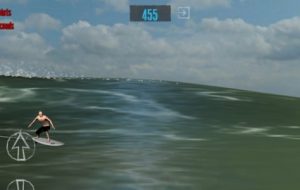
This is a surfing game that’s difficult to learn. Follow the tutorial and try a few practice tricks. To perform a top turn, press D, then press I, quickly. To perform a cutback, press D, then press and hold I. These letters are displayed on the right side of the screen; it spells ‘RIDE.’ The location of the surfer on the wave may affect which moves are possible.

You could surf through the level with the up and down arrow, avoiding crashing waves. However, to unlock the next surfing region, you may have to complete challenges. This includes performing complex moves.

What’s good about this game? Surf waves and surf sounds
What’s wrong with this game? Some surfing tricks are too fast to see after tapping the buttons.

3. Trial Xtreme 4 (Google Play Store)

Graphics: 3/5 Gameplay: 3/5 Replayability: 4/5 Enjoyability: 3/5

Overall Score: 13/20

This is a motorcycle game that takes place on obstacle courses through exotic environments (angled side-scrolling). There’s ramps, bridges, and hills. There are checkpoints. While jumping on ramps, use the leaning buttons to land safely. You may have to use the lean button while accelerating to avoid falling backwards. After the tutorial, you can play in new locations. You can practice riding in a new stage or race against another player. New game modes are unlocked after completing 3 levels.

What’s good about this game? The background environment is well-designed.
What’s wrong with this game? Racing against another player on an obstacle course is distracting.

List of Features:

Snowboard Party: World Tour

  • Touchscreen analog stick or accelerometer tilt motion control
  • On-screen controls are customizable – change location and opacity of icons
  • Controls: Front-hand Grab; Rear-hand Grab; Slide; Jump/Air; Accelerate; Steer; Slow down
  • Pause button
  • Game Modes: Freestyle; Halfpipe and Big Air; Time Attack; Multiplayer
  • Each level has objectives to complete
  • Music plays in the background
  • Snowboarder’s gear is customizable
  • Upgradeable Attributes: Speed; Spin; Balance; Air
  • Each character has a background story
  • Tutorial
  • On-screen information includes the following: Stance; Trick Name; Last Trick; Total Score; Current Combo Score
  • Trick List
  • Post to Twitter option
  • Achievements
  • Leaderboard


Trial Xtreme 4

  • Touchscreen control or accelerometer tilt motion control
  • Bike customization
  • Rider customization
  • Game Modes – Packages, Duel, Tournament
  • Acceleration button
  • Pause button
  • Screenshot button on pause screen
  • Share on Facebook or Twitter
  • Crash button on pause screen
  • Restart button
  • Lean forward button
  • Lean back button
  • Hop button
  • Track map showing progress and previous run
  • Timer
  • Music and sound effects options
  • Player stats
  • Change nickname option
  • Notifications
  • Social Media options – Facebook, Google Play, Twitter
  • Achievements
  • Leaderboards

The Journey – Surf Game

  • Game Modes – Multiplayer; The Journey; Practice
  • 26 surfing regions
  • Unlock regions by riding waves
  • Complete challenges in each level
  • Store – surfboards, t-shirts, etc.
  • What’s New notifications
  • 4 camera perspectives: Default; Back; Front; Drone
  • Facebook Invites
  • Soothing surf wave sounds
  • Exit button next to counter
  • Boosters – Tube; Maneuver; Timing
  • Replay button
  • List of tricks
  • Youtube video demonstrations of tricks
  • Customization options for surfers
  • Audio options
Categories
Lists

5 Best Travel Apps For Exploring A New City Like A Local

You have finally reached your dream destination and are all but ready to explore the place, but you have absolutely no clue whatsoever regarding where to start. Well, you won’t be the first or the last person on planet earth to face this dilemma. In this post we have tried compiling a list of the 5 best travel apps that you ought to have on your smartphone if you are thinking of exploring a new city:

Musement
Musement promises to be your perfect city guide regardless of the place you are in. It provides with information on the best attractions, bars, restaurants and even concerts happening around you. You even have the option of tailoring content as per your liking and choices. The app covers more than 350 cities around the world so you can be pretty sure that you are always in luck to find out the best place to wine, dine and enjoy some good time in the city you are traveling to. Musement also happens to be one of the best travel apps for iPhone.

Trip.com
There is no better arsenal for a traveler than having a travel research app on their smartphone. Trip.com features more than 60,000 destinations worldwide with users reviewing places based on a variety of different aspects. If you are looking for cheap travels within a city then all you need do is set your preferences on the app and it will do the rest. It will manage your preferences and suggest the best places that you can visit as per your budget and liking.

Localeur
No one knows a city better than its locals. If you have planned your vacation to a new place and don’t know jack about the place you are heading to then the Localeur app promises to be your personal guide. The app has a budding community of local tastemakers that provide the best recommendations on the best things in the cities. There is no one better than these local tastemakers to help you out in your endeavor of visiting new places in a city.

Nearify
Looking for the best events near and around you? Well, look no further than Nearify. The app searches from more than 20 million events happening worldwide to provide you with the best options around you. Users also get the option of searching through an assortment of choices based on their likes and interests. You can see the events trending around you and make your way to the best option available. If you are looking for more such tips, then be sure to visit savvyexpeditioner. The site has daily updated content on the latest destinations around the world from expert reviewers.

Meetup
If you are someone who prefers company whilst going out then this is the app for you. Meetup helps you meet up like-minded people in the vicinity that you can hang out with and enjoy some events together. Meetup is basically a listing of local events and groups near and around you. All it needs is your location to stir some magic and voila, you are golden.

Traveling is always fun but having a traveling guide in the form of an app is like a wish come true. Make sure to check these apps out today.

Categories
Lists

Reviews: Interesting RPGs

Role-playing games are funny. They could be fun to play as well. Or, they could be laughable, especially by gamers that haven’t been exposed to such gameplay. Here’s three interesting RPGs in the Google Play Store. A list of features for each game is provided at the end of this article.

DigimonLinks (Google Play)

Graphics: 3/5 Gameplay: 4/5 Replayability: 4/5 Enjoyability: 5/5

Overall Score: 16/20

This game takes place in a world full of fragmented data. The goal is to save the digital world with Digimon links. To do this, you have to train Digimon in the Farm. There are several areas within the Farm including the Lab. After a digimon evolves into a Rookie, they can enter battles. To increase their level, feed them meat. In battles, use Skills to win. On the battle screen, there’s an Attack button and two Skills are assigned. There are several waves of enemies in each round. This RPG is fun to play. Remember to earn digivolution fuel in battles before evolving the digimon. The battles are located in the Explore section.

What’s good about this game? The turn-based battles are easy to play.
What’s wrong with this game? Nothing. It’s perfect.

The Alchemist Code (Google Play)

https://www.youtube.com/watch?v=3vbFjPUFmNQ&feature=youtu.be

Graphics: 3/5 Gameplay: 2/5 Replayability: 2/5 Enjoyability: 4/5

Overall Score: 11/20

This RPG is set in a world of alchemy. There’s an intricate story and turn-based gameplay. Some of the role-playing elements are laughable. Press the ‘End’ button to use the next character. It will take time to cycle through all the characters. One element that is noteworthy is the grid-based weapons, which affect every character within a certain area. If you die, use gems to start from the same point.

What’s good about this game? The music and story is good.
What’s wrong with this game? In battles with multiple allies, it’s difficult to identify which character is active. Also, each action has to be approved after it is selected.

Final Fantasy Brave Exvius (Google Play)

Graphics: 2/5 Gameplay: 2/5 Replayability: 3/5 Enjoyability: 2/5

Overall Score: 9/20

This RPG is an old-styled game with text-narration located under the scenes. The story is revealed, and an ensuing battle occurs. The main character is Rain. A companion is available to go into battle with you. The gameplay consists of turn-based action. Select a character to use when it’s your turn. To view and use the character’s powers, swipe the label left or right.

What’s good about this game? There’s an ‘auto’ button that plays the game for you.
What’s wrong with this game? The specs for each character aren’t presented well.

List of Features:

Digimon Links

  • Log-in bonuses for beginners
  • Missions – Tasks to complete – Beginner; Daily; Cumulative
  • Explore – Battles – Absolute Loyalty; Advent Quest; Normal Quest; Daily Quest
  • Solo and Co-op play
  • Selectable targets during battle
  • Multiple waves in each round
  • Attack button and two skills mapped to screen
  • Training – Several factors including food, enhance, research, ability seeding, etc.
  • Digivolve – Evolve Digimon with digivolution fuel
  • Party Formation – Create team of Digimon
  • ? menu provides information and instructions
  • Exchange
  • Facilities – Lab, Meat Field, House, Colosseum, Recruitment Notice
  • Upgrades to facilities
  • Capture – Catch Digimon for team – Rare capture; MegaFestival; Ability Medal Capture; Link Capture
  • Capture 1 digimon or capture 10 digimon at the same time
  • Field Guide – A book containing all Digimon with descriptions
  • Shop – Buy DigiStones to evolve Digimon quickly
  • News and Presents
  • Chat room
  • All icons listed in grid format under chevron symbol (right side of screen)
  • Clear Cache option
  • Transfer options – Transfer Code; Log in with Google Play; Link to Facebook Account
  • Google Play Achievements
  • Audio Settings – BGM; SE
  • Inquiry Form

The Alchemist Code

  • Detailed story and movie-like introduction
  • Story in-between battles – text dialogue boxes
  • Tap through dialogue to get to action or use ‘Skip’ button
  • Form team at start of level – choose the Leader and Mercenaries
  • Ability to move around and reach target and move away after attack
  • Map button reveals all areas to move character
  • Camera perspective button – change camera perspective
  • Optional tutorial
  • Missions
  • Character customization screen utilizes touch-caption pop-ups to describe abilities
  • Abilities – Physical attack/defense; magic attack/defense; dexterity; agility; critical; luck; combo; move; jump
  • Gear, Item, and Friends lists
  • Inviting shop screens – Anna’s Shop; Beginners’ Shop; Secret Shops; Coin; Exchange; Soul Exchange
  • Quests: Story; Event; Multiplay; Characters (Coming Soon)
  • Arena Mode and Multiplayer Mode (Coming Soon)
  • Facebook Log-in
  • Log-in bonuses
  • Sharing options – WhatsApp; LINE; Twitter

Final Fantasy Brave Exvius

  • Auto button – Characters will attack automatically; can be turned on or off
  • Repeat button – Repeat actions from the last turn
  • Reset button – Reset selected actions to regular actions for each unit
  • Menu button
  • Portrait orientation
  • Status bar displays time and battery power
  • Depart screen – Select team, items, and companions
  • In-battle options – view and equip weapons and items; view achievements; view leaderboards; view missions; adjust volume; change battle effects (limit burst display; turn battle effects on/off; turn background effects on/off; continuous auto-battle options; turn auto limit burst on/off; change companion name)
  • Map with battle locations
  • Summon a vision to obtain new characters (units)
  • Friends – List; Search; Find; Request; Gifts; Share; Facebook invites
  • Units – Sell units; Awaken (unlock) abilities; Enhance units; Awaken units
  • Shop – Lapis; Slots; Lapis Inventory; Restore NRG; Bundles
  • Trophies
  • Guides for Items, Materials, Abilities, Equipment, Recipes, Units, and Monsters
  • Consecutive Log-in Rewards
  • Daily Rewards
  • Events
  • Rookie Quests
  • Daily Quests
  • Options for D-Pad
  • Game Options – Language; Account; Sound; Exploration Options; Battle Effects Options; Select Party; Automatic Protection Settings for new units; Dialogue Options; Push Notifications
  • News, hints, tutorial, and customer support
  • Mailbox
  • Event notices
Categories
Lists

Reviews – The Latest Runner Games

Are you tired of the same running games? Then check out the games on this list. It contains the latest freestyle running games. There’s also a recent update to one of the most popular running games. There’s a review of each game, and at the end of the article, there’s a helpful features list that lets you compare each game.

Run Sky Dancer (Google Play)

Graphics: 3/5 Gameplay: 5/5 Replayability: 5/5 Enjoyability: 4/5

Overall Score: 17/20

In this game, the player runs and jumps over obstacles continuously. It takes place on an elevated plain of existence that consists of platforms of rocks and runways. Tap both sides of the touchscreen to jump. Collect coins along the way.

What’s good about this game? The levels are filled with challenging jumps.
What’s wrong with this game? The ending options for each run aren’t designed well.

Apocalypse Runner (Google Play)

Graphics: 3/5 Gameplay: 2/5 Replayability: 2/5 Enjoyability: 2/5

Overall Score: 9/20

This game features a stick figure that is being chased by a wave of water. Tap the screen to jump to the next platform. Tap the screen twice to jump higher. While running, collect wings. The goal is to run as long as possible before the wave of water crushes you.

What’s good about this game? The color scheme is nice.
What’s wrong with this game? The sound effects for jumping are annoying and distract from the game.

Subway Surfers (Google Play)

Graphics: 3/5 Gameplay: 3/5 Replayability: 2/5 Enjoyability: 2/5

Overall Score: 10/20

This game takes place on train tracks. The goal is to run along the tracks before a cop catches you. There are coins placed on the train cars and on the tracks. Collect as many as you can.

This game was recently update. The Subway Surfers World Tour is set in Cairo. Some of the items available include the Ankh Outfit for Jasmine. A Croc board is available for surfing the Nile River. Also, Weekly Hunts have been updated with colorful falcons.

What’s good about this game? Nothing. It’s a dumb game.
What’s wrong with this game? This game is too childish.

List of Features:

Sky Dancer: Parkour Freerunner

  • Several Dancers to choose from
  • Coin and star boosters through Felixs
  • Slo-Mo option
  • Touchscreen control
  • Upgradeable items
  • Store
  • Weekly treasure hunt
  • Daily challenge rewards

Apocalypse Runner

  • Jump and double jump
  • Leaderboard
  • Share scores via Twitter and Facebook
  • Best score and last score are displayed
  • HD option and sound mute option
  • Distance counter
  • Wings bar – collect wings as you run

Subway Surfers

  • Music on/off option
  • Sound effects on/off option
  • Reminders for Top Run, Daily Challenge, and Daily Videos
  • Top Run Friends notifications on/off option
  • Facebook Log-in
  • Daily Challenges
  • Missions
  • Hoverboards – saves player from crashes
  • Weekly Hunts
  • Leaderboards
  • High Scores
  • Shop with boosters and upgrades
Categories
Lists

Reviews: The Latest Car Racing Games

Use the smartphone’s tilt-axis functionality more often by playing a car racing game. Unfortunately, not all racing games play well with this interface. Touchscreen accelerator and brake pedals are more effective. Check out the following game reviews for more insights.

Real Racing 3 (Google Play)

Graphics: 4/5 Gameplay: 3/5 Replayability: 3/5 Enjoyability: 4/5

Overall Score: 14/20

This is a circuit racing game. It begins with racing school, which involves completing several laps around a track and modifying a race car. After graduating, compete in the Pure Stock Challenge. After finishing a race, view it with the replay option. The track camera perspective is the best.

The touchscreen interface is easy to use and responsive. You can add tilt-axis control to steer. This involves tilting the smartphone side-to-side. If you race well, you might meet the requirements for achievements. Try to obtain all the achievements.

What’s good about this game? It contains a replay option that records and replays the race perfectly. You can fast-forward, rewind, take screenshots, and change the camera’s point of view.
What’s wrong with this game? The laps are too short, and the wait times for car delivery is too long. Also, the menu screens are confusing.

Asphalt 8: Airborne (Google Play)

Graphics: 4/5 Gameplay: 3/5 Replayability: 4/5 Enjoyability: 3/5

Overall Score: 14/20

This is a car racing game without rules.You can do barrel rolls in tunnels, drive through buildings, jump ramps, go off-road, and crash into other cars. The best control scheme is auto-accelerate with tap steering. Tap the left or right side of the screen to steer in that direction. Tap the brake pedal to slow down. The best camera perspective is immersive view.

What’s good about this game? The first-person perspective of immersive view provides awesome car racing action on the ground and in the air.
What’s wrong with this game? While racing, the accelerator and brake pedal may be confused for the left and right steering control. This may cause you to lose your place in the race.

Gear.Club – True Racing (Google Play)

Graphics: 5/5 Gameplay: 5/5 Replayability: 4/5 Enjoyability: 4/5

Overall Score: 18/20

This racing game contains realistic cars and easy controls. Use the automatic acceleration option, along with on-screen arrows for steering; it’s the easiest control scheme. There’s a map with all the courses, and after each race, you can repair the car in a garage. Unlike other games, this game allows you to test drive cars. You won’t have to wait to drive expensive cars; go to a dealership and use the test drive option.

What’s good about this game? There’s a rewind button that lets you re-race the previous section of the race. This is useful when you crash or don’t turn properly.
What’s wrong with this game? Nothing. This game is perfect.

List of Features:

Real Racing 3

  • Several unlockable modes – Online Multiplayer; Weekly Time Trials; Flashback Events; Race Teams; Career (Amature, NASCAR, PRO AM, PRO, EXPERT, MASTER, ELITE, LEGEND, EXCLUSIVE)
  • Achievements
  • Leaderboards
  • Store
  • Friend Invitations – Facebook, Google+, Sina Weibo
  • Upgradeable car parts
  • Service station
  • Car customization – paint, vinyls, rims, ride height
  • Several options for steering, acceleration, and braking: On-screen Pedals; Tilt-axis Steering; Automatic Acceleration; Brake Assist; Traction Control; Steering Assist
  • Several camera perspectives: Road Surface 1st person; On-the-Hood 1st person; In-the-Cabin 1st person (steering wheel with hands and car interior); Behind-the-Car 3rd person
  • Rear view mirror button
  • Pause button
  • Replay feature
  • Screenshots – share through social media

Asphalt 8: Airborne

  • Several game modes: Tutorial, Daily Tasks, Career, Quick Solo Race, Mastery, Local WiFi, Multiplayer, Asphalt Tracker, Limited time events, Special events, Moto Blitz Seasons
  • Lots of racing locations: London, Tokyo, French Guiana, Barcelona, Alps, and Great Wall of China
  • Boosts: Credits, Tuning Kit, Nitro Starter, and Extra Tank
  • Trophies
  • High-end cars: McLaren 650S GT3, Arrinera Hussarya GT, Lotus Evora Sport 410, Lamborghini Veneno, DS Survolt
  • Great music
  • Garage – Tuning, Coloring, Car Packs
  • Auto-restart after crashes
  • Multiple camera perspectives – Fixed (close to the car), Action (far behind the car), Immersive (1st person – road surface view), Close (similar to Fixed)
  • On-screen map
  • Pause button

Gear.Club – True Racing

  • Garage – Tires, Paint, Lockers, Rally, Body, Service, Wind Tunnel, Cosmetic, & Mechanical
  • List of missions to complete
  • Achievements
  • Facebook friends invitation
  • 3 control schemes – Tilt motion for steering, On-screen arrows for steering, and Manual acceleration
  • Driver assist options – Braking, Anti-skid, and Steering
  • Optional racing line
  • Optional display names
  • Optional power saving
  • KPH or MPH speedometer
  • Adjustable music, sound, and UI volume
  • Country flags available to display on profile
  • Store to purchase gold, tickets, and rewinds
  • Multiplayer Leagues
  • Car Dealerships – view cars and test drive
  • Flash Events – Race on tracks from around the world
  • Rally Mode
  • New Environments – Unlock desert tracks
  • Rewind button to re-race previous section of track
  • Rear view mirror
  • 3 camera perspectives – behind-the-car 1, behind-the-car 2 (further back), and on-the-hood
  • Pause button
  • On-screen track map