Categories
Articles

Top 5 Apps for Entrepreneurs

Proof that you can do business out of the office using this selection of the best mobile phone apps for entrepreneurs!

Keynote

Keynote is a great app for business leaders, CEOs and entrepreneurs, despite only being available on iOS devices. The app, as the name denotes, gives you a helping hand whenever you’re giving a presentation or keynote speech.

Not only can you view, create and edit presentations on the move, but you can even add effects to the design of your presentation, placing arrows, charts and other symbols which help to illustrate your speech.

Using the Presenter View of Keynote is also hugely useful when making your presentations and speeches run fluidly. While the audience can see the current slide you are referring to, you can see the next slide in the sequence, allowing you to judge accurately what’s coming up ahead. And with the Keynote remote (sold separately), you can make your slideshow magically run like clockwork!

Keynote is available from the Apple App Store for £6.99 (approx. $10).

TinyPulse

TinyPulse is the perfect app for keeping your employees happy. After all, when you’re practically locked in your office, bombarded with papers, emails and letters, it is difficult to discover how your team is coping!

TinyPulse allows you to send out an anonymous survey to your employees, which concentrates on their happiness, progress and over-all feelings about their job. Although anyone will tell you that communication is the key within any business, employees rarely voice their true opinions in fear of facing the boss’ wrath!

However, this app allows you as a CEO or manager to identify and evaluate any problems or underlying issues that there might be on the office floor. After all, a happy workplace makes for a happy boss!

TinyPulse is priced between $29 and $149 per month depending on the size of your business.

WebEx

WebEx for mobile phones is another great app which can help you stay in touch with your business partners, clients of colleagues from wherever you are in the world. A bit like Skype for business, WebEx lets you conduct numerous video conferences at once, just using your smartphone.

Sometimes easier than sending emails, and definitely cheaper than making calls when you’re out of the country, WebEx is perfect for staying in the loop within your business at all times.

The app also makes the most of your phone’s two camera lenses; switch between the front and rear camera to show your colleagues what you are seeing as well as allowing them to see you speak.  Definitely easier than trying to swivel your laptop around to do a 360° turn!

WebEx is available for Android, BlackBerry and iOs devices and is absolutely free!

Thumb

Thumb is the perfect app for both prospective entrepreneurs as well as those who have been in business for years. If you suddenly come across a game-changing concept, but you’re not sure how it would work, simply post your thoughts on Thumb.

The app allows users from all over the globe to evaluate your ideas, photos and posts in order to rate it, allowing you to gauge whether it’s a good idea or a major flop.

You can even use Thumb in your personal life too! You might not be sure about the shirt you’ve picked for a hot date; simply take a photo of it and ask Thumb users to give their opinions. It’s less personal than other social media sites, and far more objective!

Thumb is available on both Android and iOS smartphones, and is free of charge.

Pocket

Pocket is an app which I only discovered recently, and is one that has completely changed the way I use my smartphone for work purposes.

Have you ever come across a great article or image that you want to look at, but simply don’t have time? Pocket lets you save videos, pictures and web pages from either your smartphone or computer, enabling you to glance through them in your own time, even when you don’t have an internet connection.

Pocket is especially good when commuting or travelling; because you can read web pages offline, it means you can stay in the know with all office activities even when you’re, say, on a flight 40,000 feet in the air, or whizzing through tunnels on a train journey.

Pocket is free to download from both the Google Play Store and Apple’s App Store.

About the Author:  Charlotte Kertrestel is a self-confessed mobile phone geek and author for Mobilephones.com, a website aimed at bringing you the best mobile phone deals, articles and up-to-date news.

Categories
Articles

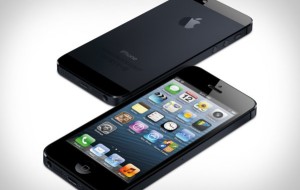
Apple iPhone 5 New Update: What’s New in iOS 6.1.4

It was only recent when Apple released another update for their mobile devices—iOS 6.1.4. This news was quite unexpected and it seems that it is only applicable to iPhone 5. So why did Apple created this update? Apparently, iOS 6.1.4 was specifically designed to improve the speakerphone.

Yes, you got that right folks. It is a minuscule modification but still a significant one most especially to those who want to get the best out of their “audio profile” experience. This minor improvement is certainly good news particularly for audiophiles. The company has practically changed the speakerphone so that iPhone 5 can produce that perfect sound.

Because of this slight update, this device is by far, the best FM transmitter for iPhone. Instead of having to endure a crackling and inconsistent sound, its new speakerphone provides a seamless audio output that can be very hard to beat. So if you are using iPhone 5 and you still haven’t updated, you might want to do it now so you can fully maximize your mobile experience.

For those of you who are still undecided if you’re going to get an iPhone or an android device, you can take a look of the following features so you can have an informed decision that can truly give you your money’s worth.

iPhone 5 features include:

  • It has a four-inch Retina Display screen at 1136 x 640 pixels. Who said you can’t watch your favorite HD movies via mobile? Clearly, you can.
  • It uses the most innovated Apple A6 processor, which provides a faster mobile experience.
  • It has a 4G LTE networking support, which makes your Internet connection the fastest one yet. Also supports DC-HSDPA networks.
  • It is a dual-band 802.11n WIFI that supports 2.4GHz and 5GHz networks.
  • You can finally enjoy panoramic images.
  • Lightning doc connector is supported, just like in the latest versions of MacBook. This one has a smaller reversible dock.

Being aware of these features can certainly assist you in selecting the right mobile device that you can happily use because you have something to compare it with. As for those who are already using an iPhone 5, do you know about its hidden features? Yes, there is a couple that not all people are aware of. These are:

  • You could take a snapshot picture of yourself or of anyone while taking a video at the same time.
  • If you’re having a really bad reception, not a problem because you can quickly solve this by enabling LTE to blast you with super-fast speed.
  • This device has a “Do Not Disturb” feature, which is an easy way to not get distracted by incoming texts and calls, without having to worry about not being able to receive important messages.
  • LED alerts for incoming messages and calls. You just have to turn this feature on in your settings so that every time someone calls you, your iPhone 5 will notify you through flashing your LED light.
  • GPS integrated maps that will direct you in every turn.
  • Face time.
  • Easy Facebook integration.

These are the things that you might want to consider before buying. You can either compare this to other devices or if you are already satisfied with these features, by all means go buy one. The point is, it is always important that everything that you need in a mobile device is provided.

About the Author: Cier is a life-loving girl, likes fresh things, and works in New York. She is blogs, she likes to focus apple products, especially the  iPhone 5.

Categories
Articles

Four Mobile Apps That You Can Use When in France

France is one of the most popular tourist destinations in the world. Hundreds of thousands of tourists from different countries go to France each year to experience its culture, food, and art scene. With that in mind, we have compiled four of the best mobile apps that you can use when in France.

MemoryLifter English/French Basic Vocabulary (iOS)

Fluency in its local language is not a prerequisite when visiting France, but being familiar with some of the phrases and words you will often use and hear isn’t a bad idea. Adding the MemoryLifter English/French Basic Vocabulary app to your iPhone, iPod Touch or iPad a few months before your trip is a great place to start. This app uses a friendly flashcard approach to helping its users learn new words. There are also additional levels in the app if you want to continue your language studies, even after your trip to France.

OffMaps (iOS)

mzl

Having an iPhone linked to WiFi or a cellular data connection during your travel may sound handy, but it can get pretty expensive if you are not careful. You can avoid off-the-roof roaming charges with the OffMaps. This app features detailed offline maps of thousands of destinations, including France, Italy, and Germany. The OffMaps for iOS also has sections dedicated for restaurant recommendations and Wikipedia articles.


Party Poker (Android)

partypokerandroidThere’s nothing more French than poker. This classic card game may not originate from France, but it is still a well-celebrated sport in the country. There are various of poker forms present in France to date, one of which is the Partypoker.fr app. You can use this app to participate in play or real money tables via your Android device.

Aside from French, the Partypoker app is also available in English, German, and Danish, among others. It is not downloadable from the Google Play Store; you can get the app from the Partypoker site. Here are the instructions:

Enable non-Market apps by going to “Settings”, then “Applications” and checking the tick box “Unknown sources. Allow installation of non-Market applications.” When the warning window appears, just tap OK. Scan the QR or go to PartyPoker.com on your Android device to start the download. Create a new account or log in with your existing PartyPoker details. When done, you can start playing.

France Radio (Android)

If you are looking for background music to set the tone of your vacation in France, France Radio is the app for you. France Radio is an application that allows you to listen to more than 260 radio stations in France through your Android device. You can also view various information about the station frequency, including its main website. You need to stay connected to any type of connection in order to use the app.

Categories
Articles

Quick Samsung Galaxy S4 Guide

Well the Samsung S4  is out- so what do you need to know? This Android phone is pretty awesome. I have been reading quite a bit about the phone and have pulled together some of the better posts out there on the Samsung Galaxy S4 for your review.

Reviews:

Samsung Galaxy S4 review – AndroidCentral.com

Galaxy S4 Deep-Dive Review: More Of The Same, But Better (For The Most Part) -AndroidPolice.com

Samsung Galaxy S4 loses to iPhone 5 in ‘breakability’ test, and here’s why you should have seen it coming – AndroidAuthority.com

Samsung Galaxy S4 vs. HTC One and Nexus 4: Which should you get? – Computerworld.com

Specs:

Samsung Galaxy S4 official specs and features – AndroidAuthority.com

Manual:

Samsung Galaxy S 4G Manual / User Guide – PhoneArena.com

Accessories:

Samsung Galaxy S4 accessories -MobileFun.com

Now if you are still on the fence whether or not you need to get this new phone from Samsung, check out this video from its launch in India.  If this does not convince you to purchase the phone, not sure what else will!

Categories
Articles

Top 5 Everyday Apps that Could Change your Life

With today’s ever growing range of mobile phones being increasingly dominated by apps, it is sometimes difficult to differentiate between the amazing and the apathetically average. So here is just a small selection of everyday apps which could transform your life.

ZenAwake (iOS)

Waking up feeling spritely and energetic can feel more and more difficult with our increasingly hectic lives, especially when it comes to the end of the week. ZenAwake is a simple app that could solve a problem in your life that you didn’t even know you had.

The app on a basic level is an alarm clock. However, that’s where ZenAwake’s mediocrity, when it comes to other alarm apps anyway, ends.

ZenAwake doesn’t just wake you up with a blaringly loud tone each morning, jolting you out of a deep sleep and guaranteeing you wake up on the wrong side of the bed. Instead, this app wakes you up with its ‘Golden Ratio’, playing quiet, soothing tones in a steady build-up ten minutes prior to your get-up time. The science behind the app is that by waking you up gently allows your body to emerge from its slumber in a natural manner, making you a happy chappy for the remainder of the day!

If that isn’t enough, you even get woken up to an inspiring quote from the likes of Ghandi and Einstein. What more could you want first thing in the morning?!

Mailbox (iOS)

Mailbox is the infamous game-changing app which, well, is exactly what you’d expect: a mailbox.

However, this app’s take on organising your emails is nothing like you’ve seen before. Mailbox allows you to sort through your inbox in one simple step, without making it feel like a chore. Simply swipe the email, without having to even open it, to send it to your archive or trash folders, or even snooze emails so you can deal with them later.

How often have you opened and read an important email, only to click off it and forget that it ever existed? With Mailbox, you can force the email to pop back into your inbox later that day, tomorrow, next week or even next month, ensuring that you never overlook an important message again.

The only bad news is that there are about 700,000 people ahead of you in the queue to get the app. But, in my opinion, it’s definitely worth the wait!

Tweetdeck (Android, iOS)

Tweetdeck, I’ll be the first to admit, is nothing new to the world of mobile phone apps. However, for anyone who has more than one Facebook or Twitter account- whether one is personal and another for business- Tweetdeck really does simplify the way you keep up with social media no end.

Simply download the app and add as many social media accounts as you like. You can then glance through all of your separate accounts, posting, liking or retweeting posts, without having to sign out of one account only to sign into another. With one single log in, you can control every one of your social accounts using the simple interface and customisable dashboard. Why make it difficult for yourself when you don’t have to?

Waze (Android, iOS)

Waze really could be a lifesaver for any of you out there who spend hours each week sitting behind a steering wheel on your daily commute. The app isn’t just any other navigation app which directs you from A to B, but is an app which could turn miserable car journeys into a thing of the past.

What makes Waze different is the fact that it takes into consideration traffic, accidents and road diversions on every journey, in order to get you to where you need to be using the quickest, not always the shortest, route possible.

The app uses live traffic information to alert you to upcoming traffic jams, and even allows you to alert other drivers to any accidents, incidents or roadworks which could affect other people’s journeys.

So why not get from A to B in super-quick timing, and do a good deed to help out fellow drivers?

Manila (iOS)

Manilla, above all, is the perfect app to help you gain control of your finances. Not only is it free and easy to use, Manilla lets you record and manage your accounts, bills, utilities and other expenses in one handy app, controlled with just one password. Why should it be only be your mobile phone contracts that you can manage using your phone?

If nothing else, this app could change the way you budget, save and spend each month, allowing you to review your spending without having to get the calculator and accounts books out.

The app also ensures that you never fall behind payment dates by sending you reminders when bills are due, as well as storing all of your account documents in one organised file.

 About the Author: Charlotte Kertrestel is a self-confessed mobile phone geek and author for Mobilephones.com, a website aimed at bringing you the best mobile phone deals, articles and up-to-date news.

Categories
Articles

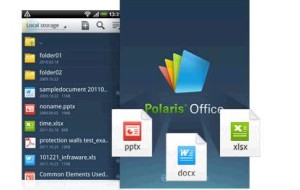
Polaris Office 4.0 App for Android – Review

After impressing iOS users with an outstanding office app, Polaris Office 4.0 has moved on to Android users by offering a pleasant work experience. The Polaris Office 4.0 app for Android accomplishes what no Android office app before it could. With its stylish and intelligent user interface, the app makes working on an Android device quite an enjoyable experience. Decent editing options, support for multiple formats and the indispensable DropBox support make it an app worth owning for all Office users.

The brilliance of the app’s user interface is evident from the moment you fire it up. The first screen shows previews of documents that you’ve recently opened. As you scroll through the documents they slowly move up and towards you. The ‘Browser’, ‘Cloud’, ‘Form Type’ and ‘Favorites’ submenus are conveniently located at the bottom of the screen.

Inexperienced users need not worry as Polaris Office contains a neat set of tutorial literature to initiate those new to it. This is unlike most other Android apps that prove to be a bit of a challenge for the uninitiated due to a lack of user friendly help in the beginning. As of now Polaris Office supports formats like .DOC, .DOCX, .PPT, .PPTX, .XLS, .XLSX as well as .TXT. There is also .PDF support so you have your basic new as well as archaic file formats covered.

The app has sizeable menus that make for simplified navigation on a smaller screen of a smartphone. A sliding menu makes changing the size of the font incredibly quick while the font sizes are also displayed alongside one another. A great aspect of the app is that the interface is consistent across the app whether you’re editing a Word document or an Excel Spreadsheet, thus, greatly easing the learning curve.

Polaris Office takes complete advantage of all the touch gestures at its disposal. Familiar gestures like pinching to zoom and swiping left and right to view the next page are incorporated into the app. A remarkable aspect of Polaris Office is its text to speech (TTS) feature. Any piece of text can be highlighted and the app will read it back to you.

While the app does not give users the ability to add comments to documents, it can nonetheless read comments made previously in the “memo” view. This and the app’s ‘find and replace’ option would prove very useful to editors. Both features however are in need of improvements in order to really facilitate the editing process.

On the whole, it seems as though Polaris Office has been created with excellent document creation capabilities but it is somewhat lacking in editing options. That seems a bit strange considering it’s a mobile app that most users would access to continue working on a document that they created on their laptops or desktops. The app also lacks a “track changes” option which would doubtless be welcome in future updates.

Polaris Office for Android also doesn’t have the kind of functionality that its iOS counterpart does. This is especially obvious in the Android app’s inability to support any cloud services other than Dropbox. The iOS version offers support for Google Drive, SugarSync and Box, something that Android users would definitely appreciate in a future update.

All in all, Polaris Office has a polished appearance that lends a professional look and feel to its user interface. The app offers some serious competition to other office apps for Android. As long as its makers, Infraware, develop additional cloud support and add to the app’s existing editing features, Polaris Office can go on to become a must have for every business user.

About the Author: This article has been brought to you by Ethan Millers of bw9.com, a site that offers savings and current information on Comcast cable and internet.

Categories
Articles

Grand S – ZTE Flagship Ultra-Thin Android Smartphone (First Look)

 It looks like we get a new ‘world’s thinnest’ or the ‘world’s smallest’ smartphone hitting the market scene every month. While the manufacturers and designers of these smartphones are trying hard to crunch the girth and the increase the power of their smartphones, buyers don’t seem to find their smartphones small enough, powerful enough or thin enough. The perennial need for the thinner, smaller and the faster has touched a new high with the new ZTE Grand S smartphone.

The CES 2013 event, true to its tradition, has thrown up some pretty high-end products and futuristic technologies. If you had happened to chance upon some of the tech forum comments and blogs on the Internet over the weeks leading up to the CES, you’d know how excited we’ve all been for the launch of ZTE Grand S.

This smartphone comes with everything a smartphone spec expert would want in his phone. The ZTE Grand S comes with a 1.7Ghz Quad Core S4 processor, 16GB in-house storage and 2GB RAM. The Grand S packs a 5 inch 1080p screen that supports full HD. The display looks great; images look vibrant, sharp and vivid. The fact that such great specs come packed in a 142 X 69 X 6.9mm make it all the more interesting. It is important to note that this smartphone wraps LTE and NFC into its ultra-thin body.

There is a 13MP rear facing camera and a 2MP front end sensor. The pictures taken on this camera stay true to their original color and sharpness. The shots were well detailed and the images came to life, thanks to the smartphones HD display. Some of the pictures taken using ZTE Grand S’ front facing 2MP sensor are so good that they can give many rear-facing smartphone shooter’s a run for their money.

Being powered by Android 4.1.2 Jelly Bean makes this smartphone fast and powerful. Although it’s too early to comment on the Grand S’ software, it was a little surprised to find the manufacturer’s custom User Interface. But when we installed Nova Launcher, the home screen replacement app, everything started working fast and smooth. But, since it’s still early days, we can’t make up our mind if this is the best manufacturers UI yet. We’ll have to wait for this smartphone to hit the stands to be able to decide on it.

If you are a prospective buyer with a flair for color, the Grand S will not disappoint you at all. The designers at the Grand S team seem to have made sure that every buyer’s tastes are catered to. This smartphone comes in a number of color choices and finishes. From matte finish to glossy finish, from the soft touch to the pearl finish, these phones are designed to suit everyone’s needs.

Presence of a MicroSD card, the likely price or battery capacity has not been announced yet, even though news has touched our ears that this smartphone will hit our storefronts in the first half of 2013.

About the Author: Travis Ramsy likes writing articles related to Technology News, Gadget Reviews and How To. He also does guest posting for buycharter.com – a site that offers savings and current information on charter cable, as well as charter.com services