All-In-One Toolbox, equipped with 29 Android system tools, is designed to clean up junk files, boost memory, protect private info and speedup Android with one-tap cleaning and process killing. The app is free and contains a ton of tools that you can find helpful to keep your Android device running smoothly.
The Voice Search Gallery, which is like Siri for your photo gallery, lets you easily search through your mobile photos and videos by voice: Find your photos and videos by saying when or where they were taken, or what you took pictures of.
Also, you can add searchable voice-tags to photos and videos. Now you can quickly find and share multiple photos and videos of your friends, vacations, cat, etc.
How can you do this?
You may quickly search for your photos and videos by saying when they were taken. This includes all the photos and videos that were on your device before you installed the app.
Photos and videos taken with the Voice Search Camera may be retrieved later by saying where the photo or video was taken.
You may also tag individual and group pictures using your voice with customizable search terms.
Search With True Privacy: You won’t have to upload your photos and videos to a cloud service or to photo sites like Google Photos or Picasa before you can search them. Instead, search your photos and videos directly on your device. No network connection or gallery sync required. That way, your photos & videos truly remain private until you want to share them.
The folks over at GeekSoft have put together a neat app/service that allows you to connect and manage files on your Android device via your PC, wirelessly! It is free and it just plain works!
Web PC Suite gives Android users a very good tool to easily access files on their mobile devices. To get started, you will need to download the Web PC Suite app and install it. When you first run it, you will be presented with a screen telling you connect to your computer. Now the computer and Android device need to be on the same wireless network. There are two ways to connect:
Go to http://www.webpcsuite.com and scan the QRcode on the screen
Go to the specific web address the app provides.
Now on the computer, a new desktop will appear. Here you will see folders for :
Apps
Videos
Music
Gallery
Files
Click on the appropriate folder and you will see those items that are currently on your Android device. Now you can do what you want- watch movies, browse photos, delete files, photos, apps, etc. There is an online help section too if you need it. You can even have multiple folders open at one time.
Connecting to my Note 2 via my computer and using its big screen is great. No more accidentally hitting the wrong icon with my thumb! The desktop is nicely laid out, making it easy to find and organize things. I found the connect was stable and had no problems what so ever. The desktop also has a small section on the right telling you what OS you have and how much file space you have left.
If you are looking for a simple and easy to use way to deal with files on your Android device and you do not want to deal with your device’s small screen, then Web PC Suite is what you need to try. Since you are connecting over the web, there is no PC software to install so you can do this on any computer. With Web PC Suite being free, not sure why you would not want to try it.
Looking for a new email app for your Android device? Need to remove the crap (as they say)? Well MailWise might be your answer.
Now I have not tried the app yet but a buddy has and he says he like it. I did ask the developer if there is a web interface or iOS version down the road and they said no and yes respectively.
From their press release:
Most email apps have taken a different approach to organizing your inbox with the unification of multiple accounts or email labeling, but the problem of easily reading just what you need still remains unsolved. MailWise’s mobile email solution addresses the most significant component of every email conversation – the actual content of the email. The app’s clutter-free conversation view is unparalleled by any other apps, saving valuable mobile real estate and helping users overcome information overload.
MailWise, which was previously available as a beta version, provides a mobile email experience easier and faster than others’ due to features including:
Grouping of all repetitive notifications (i.e. Facebook birthday notifications),
Intuitive gestures
Chat-like view for all email conversations
Removal of repetitive information (i.e. signatures, and headers)
Color selection
Control of when to receive notifications
Supports all major email services including Exchange
The app communicates directly with your email without using an external server (beneficial for employees worried about corporate data leaking out)
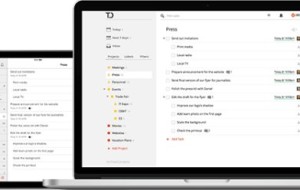
Our favorite to do list management app, Todoist has just been upgraded and is now called Todoist Next. This official launch was about a week ago and since then the developer has been working hard on updating things. We at AppReviewCentral, really love the app and use it every day. It is highly recommended. So what is up now?
From the press release:
With this rewrite, Todoist Next becomes the most robust task manager on the market. It is the to-do list tool that’s available on the highest number of platforms, offering all the most essential productivity features with distinctly sleek design.
Todoist Next allows users to smoothly collaborate with one another across 13 different platforms– for free. Delegate tasks to a family member, coworker, friend, or others, add comments to the shared tasks, and receive notifications regarding delegated tasks. Todoist Next makes it easier than any other task manager to increase productivity– not just alone, but now alongside life’s most important people.
In addition, the software offers a new scheduling feature that makes adding or delegating tasks to a daily, monthly, or yearly calendar extremely simple. And all of the tasks and data that are housed in each users’ Todoist Next account are now in real-time synchronized across all platforms, something previously reserved for just premium users.
The new features of Todoist Next are beautifully experienced thanks to Todoist’s characteristically minimalistic design and intuitive User Interface. All of the web, desktop, and plug-in apps have also been completely revamped to reflect the fresh look that goes in-hand with Todoist Next. The new software also has updated interfaces for project and task labels and powerful custom filters that make getting things done a true pleasure.
So to summarize:
Collaborate with anyone across 13 different platforms, including top-rated mobile apps for iOS and Android. Collaboration includes delegating tasks, discussing to-dos, and getting notified when changes happen;
New streamlined design that lets you focus on your tasks;
New visual scheduling makes it easy to plan your days;
Real time sync for everyone– never think about syncing again. We make sure your data is everywhere you are and it’s pushed in real time.
As a freemium user, you can invite 5 people to a project for a total of 6 people. As a Premium user, you will be able to invite 25 to a project (meaning a total of 26 people).
Again this is a great app and service which works well on ALL platforms, which is what I really appreciate about it.
If you ever needed to professional record anything, then I highly recommend you try Voice Pro from A&G Software. I need to thank them with providing me a copy of the app to try for this review.
Voice Pro is one of the most complete and comprehensive recording apps on the Android market today. I have to say that I was very impressed with all of the options and capabilities the app has. The uses of the app are numerous. It is great if you are recording an interview or recording a narration for a video. Recording is the easy part, the key to the app is all you can do after your record!
You can go to the Google Play page and read the list of features, but I want to highlight some of them here.
You can record and convert with more than 200 audio formats
You can customize the setting for the: audio source, spectrum, UI settings- local interface options, and IO settings- local backup options
Under the audio source you can modify the sample rate, encoding, audio channels, mp3 quality, bitrates and more. Sound complicated? It might be but you can also just use the standard settings. If you are a professional, you really will be able to use this voice app to its fullest.
You can voice to text
You can record phone calls
You can purchase additional plug-in to extend the app even more
You can backup to email, Dropbox, Google Drive
Ok now to the app. Yes it works as advertised. The user interface is nicely laid out and pretty easy to follow and find things. The app will provide useful hints along the way too if you need them. If that is not enough, they have a very helpful and informative You Tube channel and online forums .
Once you record your audio, then the fun starts. I am not an audio expert but within a few minutes I was easily cutting/pasting my audio clip, doing a noise reduction, and using the equalizer manager. You can even change the temp of the recording so you can sound like those guys that read really fast regarding the legal stuff in commercials! You can add fade-in-out, reverb, change pitch, and speed or even remove the vocals all together.
As I said, it really is like a professional sound studio in your pocket. Now is this app for everyone? Probably not. At around $12, this will keep some folks away but for those that need high quality voice and sound recording, conveniently available on their Android phone, then this app, VoicePro it definitely well worth the price. After speaking with the developer regarding the future, well they are open to suggestions from you the users.
Now that Astrid is gone, what app or service should you use to manage your tasks or to-do-lists? There are a ton of them out there and my recommendation is to try them first. Most are free, so you can see the features each has and how they fit your needs. After playing around with a few of them, I decided to use Wunderlist. To be honest, I wish I had used them from the get go.
For me I needed a task management setup that had the following requirements:
Free
Has a web interface (Chrome plugin a bonus)
Android and iOS apps that sync to the website
Ability to create folders or groupings based
Ability to print tasks
Wunderlist has all of these and more, and it only took me a few minutes to setup my account and organize my tasks. I used Wunderlist to organize my app reviews, web projects, and even my scouting activities. I create a folder for each set of tasks (Android app reviews, iOS app reviews, Press releases, etc.) and then create a specific task for each app I need to cover.
You can set due dates, priorities, sub tasks, reminders for each item. It is very easy to reorganize your lists and task and when one is done, just cross it off the list. If you need print your tasks, you can and they are printed out grouped by folder. I never could get Astrid to do that.
The interface of the Wunderlist website is nice and clean and very easy to use. Both the Android and iOS apps look great, sync easily with the site, and have all the same functionality as the web site.
For those that need more, there is a pro version of the service. With the pro version, you can assign tasks, have unlimited sub tasks, attach files (coming soon) and have some other background images.
Check out the video below and if you are looking for a great mobile app to help you keep track of your tasks and to-do-lists, give Wunderlist a try.