Categories
Social Networking

Pegg’d – the Ultimate Online Social Calendar [iOS]

App Name: Pegg’d – the Ultimate Online Social Calendar [iOS]

Cost: Free

Developer: Pegg’d

App Market: Download Page

Description:

Pegg’d is your ultimate social calendar. Pegg’d is a social networking application, where user can discover events happening in their city, see which events their friends are attending, buy tickets for those events.

This iOS app has the following features:

  • Discover Art, Music, Social, Dance, Sport and Theater Events
  • Sign up through Facebook, Twitter or Email
  • Buy tickets online quickly, safely and securely
  • Event Feed shows you everything that going on so you don’t miss anything
  • Share events with friends, family and all extended social networks on Facebook, and Twitter
  • Pegg’d Profile create a profile on Pegg’d of all of the events
  • Geo-location on Pegg’d automatically finds all of the events going on around you
  • Pegg’d is Available in 50 States
Categories
Reviews Social Networking

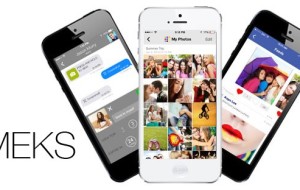
MEKS (Social Networking Simplified) – iOS App Review

Are you on your iPhone  a lot, social networking? Need to help organize and streamline the process? MEKS is an universal iOS app to help with your social network. mek-screen

After your download this free app, you will need to create an account , username, and setup your phone number. After that is done, then the fun begins. There is quite a bit to the app and you will want to spend some time setting it up and getting familiar with where everything is located.

From what I have seen, MEKS is its own social network, sort of a combination of Twitter and Facebook. In the app you will have your own username and feed like Twitter, plus you can follow and have followers.  You can add events, invite folks to it, add photos and videos, and finally like items similar to Facebook.  To make this app effective and useful you will want to get your friends involved.  After testing the app a while, it should not be to hard.

The app’s layout is clean and bright and allows you to access your stuff via numerous ways. The main sections which most will use are:

  • Feeds– Here is where your MEKS feed is located. You can post text and images, events and your own Twitter feed.
  • Messages – Here is where you can message (text) your friends.
  • Events – A listing of all events, yours and those you are invited to.
  • Photos – A nice gallery of photos: yours, friends, followers, and those you follow.
  • Videos -A listing of videos: yours, friends, followers, and those you follow.
  • Camera -Links directly to your camera making it easy to take photos on the run.

Users have the ability to customize the app some but more importantly, they can set the privacy settings for all of the items above. I was very happy to see that the app allows you to determine how much information others can see, which is very important in today’s digital world. There is  a short Help Center for those that need a quick overview.

Overall I found the app easy to use, once I set up my account. The user interface is straight forward and one can easily move from section to section. Those that are heavy social networkers should find this app useful.  From the App Store page, the developer indicated that there is more to come so it will interesting to see how MEKS develops.

The app was not found in the store. 🙁
Categories
Reviews Social Networking

Tweetary – A new Twitter Client and more [iOS App Review]

I am a big Twitter user. I use Twitter to gather news and information, plus provide updates to my followers on what AppReviewCentral is up to. Tweetary is a new app for iOS (iPhone and iPad) that gives you a new way to handle your Tweets.

Tweetary comes in three version: universal $4.99 , iPad only $2.99, and iPhone/iPod only $1.99 USD. Setup is pretty simple, you need to make sure your Twitter account is setup on your device and that the app has permission to access Twitter. After doing  this, it took a few minutes for my account to download and populate the app. The app allows for multiple Twitter accounts.

Tweetary has 3 major components and I will touch base on each one separately.

Standard Twitter client: The app provides the basics that any Twitter user would need. You can see your tweets, followers, who you are following, your lists and of course create tweets. This part of the app works fine. You only view one account at a time  but you can easily swipe your way to another account. The interface is pretty straight forward and I did not have any trouble.

Metrics: The app provides you with some great metrics that I have not found in any other app. For each twitter account, you can  get:

  • Top @mentions
  • 31 day Tweet activity
  • 7 day Tweet activity
  • Tweet activity density
  • Tweet activity breakdown

The metrics are interesting. You get a graphical display of whichever metric you chose but there is not a lot of explanation in the app about what it all means. The average user might have a hard time initially understanding it all. Do not get me wrong, metrics are important and definitely need to be noted.

Collections: As you post a tweet it is saved and archived in a Twitter diary. You can annotate the posts in your collection and save them offline. You can call it a diary or sort of a notebook of tweets. The Gallery is of course media from those posts.  Smart Collections are created from your posts and those on Twitter that match terms you select.

The Collections section is the most unique aspect of this app. Here you can save your tweets in an organized fashion, takes notes (annotate them) and come back to them at any time. Now the app saves the tweets you send out but only from the app. I have been using Twitter for years but the app does not go back and save previous tweets into collections. You can of course go through your tweets and manually save any you want.

The overall interface of the app is very well done. I tested the app on my iPad mini and could easily find everything I needed.The controls are intuitive and the menus are very well done. The app appears to be only in portrait mode but that could be due to the version of the app I tested.

I like the app and it does what it says well. Now, for the average Twitter user, I am not sure if they would find this app useful. I think this app is geared more toward the power users. The other aspect is that you need to use the app all the time to utilize its full potential. For me I am on the web more, simply because I am glued to my desk/computer. Also for these old eyes, I definitely would need to use it on the iPad.

The developers are definitely looking for input on the app and have forums setup for help and feedback which is a good thing. This is a very new app, so it will be interesting to see where it goes. If you find yourself on Twitter a lot and want a mobile platform that provide metrics and a way to save you tweets, then Tweetary might be the answer.

Unknown app
Unknown app
Developer: Unknown
Price: Free
Categories
Social Networking

Ifyoupic [iOS]

App Name: Ifyoupic [iOS]

Cost: $0.99 USD

Developer: ari vigo

App Market: Download Page

Description:

ifyoupic is a social network app that let you create pics with messages about your life and share, like, re-blog and re-tweet them with people that are the same as you.  It’ s got beautiful designs and uses swipe and tap gestures with colorful animation. It is both fun and easy to use.  With the app, you can write your own customized message or any text you want.

ifyoupic can be used for all popular social networks such as Instagram, Facebook, Tumblr, twitter and more.

Features:

  • 96 messages to share, re-blog and re-tweet.
  • write your own messages to share.
  • 63 beautiful gorgeous designs.
  • use swipe to explore the designs with cool animation.
  • share icons: heart and thumb up (like), re-blog and re-pin.
  • share on Instagram, Facebook, Twitter and camera roll and more.
Categories
Social Networking

LetsWOM! “The New Word of Mouth” [iOS]

App Name: LetsWOM! “The New Word of Mouth” [iOS]

Cost: Free

Developer: LetsWOM!

App Market: Download Page

Description:

Come join LetsWOM! “The New Word of Mouth”

Give and receive advice about Products, Services, Businesses & more from your friends and their friends by Word of Mouth.

Find out what your friends are Woming with their friends and Research for trusted Word of Mouth information.


Categories
Social Social Networking

InChat App for LinkedIn [iOS, Android]

App Name: InChat App for LinkedIn [iOS, Android]

Cost: Free

Developer: DeviceBee Technologies

App Market: Download Page

Description:

InChat for LinkedIn is the new app that keeps you connected to your most values network, your LinkedIn connections. With LinkedIn Chat, you can instantly chat with whoever is online from your network, sending offline messages.

Port your entire LinkedIn network into one mobile app so you can chat instantly with them.
With InChat App You can get in touch with your LinkedIn connections automatically without looking for them.

InChat Features:
+ Send and receive offline messages
+ Instant chat with your Linkedin Connections who have INCHAT app installed
+ push notification to alert incoming message
+ Message will be saved in server when user offline.
+ Easy to sync new contacts
+ Support multiple languages
+ Check the update and profile of your connections
InChat is a cross-platform mobile Instant messaging app which allows you to send instant messages to your LinkedIn Connections.

InChat for LinkedIn is for those that need to keep in touch with other professionals on the go.

Categories
Social Networking

Yes We Want [iOS]

App Name: Yes We Want [iOS]

Cost: Free

Developer: I See U

App Market: Download Page

Description:

This app is original : users can “want” an app to say “Hey ! I like your app but it’s too expansive, so please, drop its price”. Once we have enough “wanters”, we contact the editor ; if it accepts to drop it price, we will made a push to the wanters so they can download the app.

Search for an application in Yes We Want- Our search engine is connected directly to the App Store, you can find any application you want;

Vote for it! -Simply click on the button “I Want it!”

Make some noise!- Invite your friends, family, via Facebook, Twitter to join you, click “Share” and share your discovery in a few seconds on the social networks to encourage them to vote as well.