Categories
Reviews

Hill Bill [Android Game Review]

Bill, a hillbilly motorcyclist, has dreams and aspirations of becoming one of the greatest motorcycle stuntmen since Evel Kneviel. Your job is to help Bill ride dangerously through six worlds and 60 levels, beginning with the homemade courses created in Bill’s own backyard. As you continue to hone your biking skills and perfect your trick stunts, you will help Bill progress his career by entering him into more “high-profile” venues such as mud rallies, the Circus and eventually the Grand Canyon.

Within the first few levels, the game will show you how to use the basic controls, how to perform certain stunts and additional ways to boost your score. In the settings menu, you will be to control the volume for sound effects and main music, sync the full version purchase with the trial version, reset your in-game progress, adjust the game control orientation for left-handed and right-handed users and view the credit roll of the game’s developers.

This 2-D scrolling platform game is enjoyable and easy to play with smooth graphics, excellent physics and an interesting storyline. Each short level is setup like a puzzle; therefore, the technique and game plan you used to bypass specific levels might not work for every level. Besides the actual gameplay, one of the more impressive features in this game is how well the developers stayed true to the app’s hillbilly motif, down to the slang dialect.

As with many mobile games today, Hill Bill utilizes social media immersion by allowing its users to post their accomplishments on Facebook and log in with their Google+ account to track their in-game Google Play achievements. I have also noticed that there are a lot of parallels between this game and Angry Birds including the use of cut scenes, user camera pan controls to view the level to preplan your approach and a 3-star level ranking system. As you face each high-flying level, you are not only playing for points, stars and additional levels. You are also playing to earn Star-Spangled Bucks to go shopping for faster and better motorbikes and more outfits for Bill.

The trial version will limit you to play the first ten levels in the first world. It only costs 99 cents to purchase the full version, should you choose to do so. Considering how fun this game is, I would spring for the 99-cent fee to buy the full version of this high-flying adventure game.

App Name: Hill Bill

Developer: Balloon 27 LLC

Market: Google Play, iTunes Store

Cost: Free (Trial); $0.99 (Full)

Categories
Reviews

Kids Adventure [Android Game Review]

Kids Adventure is an educational game where kids can learn and play at the same time through a variety of fun and mentally stimulating puzzles. Some of the engaging types of games include seek-and-find, labyrinth and odd-one-out. The wide selection of games with ranging difficulty levels will help develop your child’s foundational skills including quick thinking and observation skills, discovery in reading, numbers and counting, recognizing simple concepts and a better understanding of letters, sounds, colors, shapes and objects.

Because the games are divided amongst the seven continents on the app’s Earth map, Kids Adventure also serves as a learning tool for preschool-aged children.  Kids Adventure will give your child the feeling like they are globetrotters virtually traveling from continent to continent by providing them with interesting information about the countries and animals around the world. A cartoon character named Fluffy Kitty will be your child’s tour guide to help him or her through each level with helpful tips and simple instructions in how to play each game.

While I was unable to download the game onto my phone due to compatibility issues, Kids Adventure looks like a great, hands-on, interactive game for young children to play judging from the demonstration teaser video provided by the developers. The games are not too complex and are simple and challenging enough to keep young users occupied and entertained for hours. This app will further develop the basic foundation for young minds and increase their geographical and zoological knowledge with the child’s digital exposure to different countries such as Egypt, Australia and Madagascar and an array of animals including monkeys, parrots, meerkats, penguins, cats and fossas.

This game has the same entertainment and redeeming learning value as games similar to the Reader Rabbit & Leap Frog series. The only downside this game has is its limited availability to be downloaded on certain mobile devices. Even though I was not able to test this game, I believe Kids Adventure would be better played on a tablet device so the child user would have more room to play the game instead of playing on a tiny screen.

If you have a young child who loves games and has a desire to learn new things, then head to the Google Play Store and get the free download, if you have the right mobile device for this app.

App Name: Kids Adventure

Developer: FlexyMind

Market: Google Play

Cost: Free

Categories
Reviews

DioNote [Android Game Review]

App Name: DioNote

Developer: Diotek Co., Ltd

Cost: Free

Market: Google Play

DioNote is a notebook app that lets you create memos for anything from remembering key dates to your grocery list. What makes this notebook memo app more appealing than any other app of the same type? DioNote allows you to handwrite memos and they will appear as written on the virtual, college-ruled notebook paper. When you first open the app, you will be given a brief walkthrough on the basic operations of DioNote and the creative, preloaded memos will inform you of the central features of this app. The sample memos will also give you a glimpse of the possible notes you could create with this app from an artistic viewpoint.

Aside from the handwriting feature, the selling point of DioNote would probably be its versatility. You can edit your handwritten text as you would with typed text, mix handwritten text with typed text and make aesthetic changes to the handwriting text such as choosing different font color and text boldness. The canvas mode allows you to create your own colorful drawings and add other pictures to your image memo and edit them by using the app’s image editor tools.

If you have an Evernote, Google Drive and/or Dropbox account, you can send your DioNote memos to any or all of those accounts by syncing them to the app.

This app might not be as extensive as other memo apps like Evernote, but DioNote is unique in its own way by composing notes with line-by-line, handwritten text instead of the phone’s autocorrecting AI speculating what you have written by translating your writing into ordinary text.  The default notepad app on a lot of Android smartphones have this similar feature, but you will need to write clearly to avoid constantly backspacing and rewriting your written text because of the app’s inability to recognize your handwriting.

DioNote eliminates all of that guesswork and minor frustrations. Another interesting feature this app has is the ability to search your handwritten words within any document. I’ve tested this feature with a few test documents and I was amazed at how well the app recognized my own penmanship in terms of using the search tools (and I don’t necessarily have the best legible handwriting, but I digress). However, you are only limited to exclusively searching for ink-created words with ink text and text-created words with ordinary text.

Overall, DioNote is a very user-friendly, simple notebook app that allows handwritten memos without running into autocorrecting issues. This notebook app is perfect for people of all ages from children using the canvas mode to create digital works of art to college students using the entry mode to take quick notes in class. The app is free to download and is only 50MB large. You are limited to a certain amount of memos unless you decide to purchase “unlimited memo usage” within the app itself.

Categories
Reviews

Snap Camera HDR [Android App Review]

App Name: Snap Camera HDR

Developer: Marginz Software

Market: Google Play

Cost: Free (Trial); $1.99 USD (Full)

Snap Camera is a high-dynamic-range (HDR) camera application that allows users take pictures and videos and also includes a photo gallery and editing suite. The key feature that sets this camera app apart from the default camera on your phone is its minimalistic, smooth user interface. The uncluttered preview screen allows users to fully view their shots before taking a picture or while filming without having to look through numerous icons.

The app’s preview screen only features a shutter release button, movie mode button, a series of icons representing the activated camera settings and a settings button located in far left corner. The free-floating settings menu can also be accessed by simply pressing down on the screen for a half of a second and more camera adjusters and sliders will be at your disposal.

Snap Camera has more to offer than the features seen on your phone’s default camera including a wider range for specific camera settings and grid lines for advanced photographers who like to abide by the “rule of thirds” for better composed shots. This app also has its own post-production, editing suite so you can make any additional changes to your picture. Snap Camera’s Photo Editor has selection of nine filters, eleven borders, and other sliders for adjusting sharpness, rotation, automatic color, RGB curves, among others.  With this HDR camera application, you will be able to high-quality and high-resolution photos and videos by being able to take pictures up to 3264×2448 in size and to shoot video up in 1080p HD.

With its simplistic outlook and wide variety of advanced settings, Snap Camera is built for amateur and professional photographers. The semi-circular-designed settings menu gives the app a more realistic feel like an actual camera. One aspect that really amazed me how in-depth the settings menu is for advanced users. Some of the examples include setting the A/V bit rate, the A/V codec, an alternate microphone, the metering for photos, the anti-banding, frame rate for video and several HDR components.

When it comes to taking pictures with this app, there are a few things you will need to do before taking your snapshots. First, manually set the white balance, based on the lighting of your environment to avoid poorly tinted photos. Surprisingly, the auto white balance is not as effective as manually setting them yourself in this app. Second, turn on the “stable shot” feature, which is located in Settings under “More Settings” and is appropriately represented by a shaking hand icon.

When the stable shot feature is activated, a crosshair will appear within your focus ring. When you tap the screen to take a picture, it will not capture until the crosshairs change from red to green, letting you know that the camera is steady enough to take the best picture possible. This helpful feature will take the frustration out of retaking photos over and over again due to blurriness. Third, set the ISO to auto and the focus mode to autofocus to get pictures with clarity and minimal noise.

Overall, Snap Camera is a good alternative option for a smartphone camera that will make you want to say “Cheese!” The only major downsides are that this app will have a tendency to shut down unexpectedly from time to time and the autofocus and white balance settings are not available in the trial version. It’s not a huge issue unless it happens to you while you are taking pictures or shooting videos for a rare event and you missed your opportunity due to a glitch or unavailability.

The free trial is available to download, but you will have to deal with a wait time of 15 seconds every time you open the trial version. This can be fixed by setting your phone to airplane mode to get rid of the pop-up dialogue box. If you prefer not to deal that, you can purchase the full version for $1.99 in the Google Play store.

Categories
Reviews

The Fun Way To Learn Algebra [Android App Review]

App Name: The Fun Way To Learn Algebra

Developer: Henry Borenson

Market: Google Play, iTunes

Cost: Free (Level I Lite), $4.95 (Level I), $3.95 (Level II) 

During my early years as a high school student, one of the most challenging subjects my classmates struggled with was mathematics, specifically Algebra. It has been about six years since I have been in high school and, according to The New York Times, it seems like Algebra is still problematic among millions of students within the past couple of years. The Fun Way To Learn Algebra educational app could help alleviate your child’s or teen’s anxiety towards Algebra.

This fundamental tool begins with an introductory video by Dr. Henry Borenson, the creator of the app, briefly explaining the concept and goal of using this program. Afterward, you will be directed to the first level menu screen where you will begin with your first six lessons (three on the free version). Each lesson has an instructional video, two practice equations and ten exercise problems.

The free “Lite” Level I version features only three lessons and the paid Level I has six lessons and one final review lesson available. The Level II version will continue to build upon what you have learned already with eight additional lessons. Naturally, with each additional lesson, the exercises will get progressively tougher. If you follow the app’s curriculum in order, you will be solving the more difficult problems with ease.

The Fun Way To Learn Algebra is a very useful app for teachers to use as a part of their curriculum and for students to use as a study tool. Dr. Borenson takes a creative, hands-on, visual approach and uses the equations as a complementary tool rather than simply using ordinary problems to demonstrate algebraic functions. The instructional videos are long enough for the user to understand the lesson, but the videos could be more interactive to the point where they users are inputting the information into the problems as the video is playing.

With over 150 problems to solve, The Fun Way To Learn Algebra is a great educational program that is beneficial to middle school, high school and even college students to boost their confidence and suppress their fear of Algebra. The app is easy to use and guides you through each lesson one step at a time. If you know someone who is having a hard time with Algebra, I recommend this program for him or her to use to solve the problem (no pun intended).

Categories
Reviews

Neon Motocross [Android Game Review]

App Name: Neon Motocross

Developer: Motomex

Market: Google Play

Cost: Free

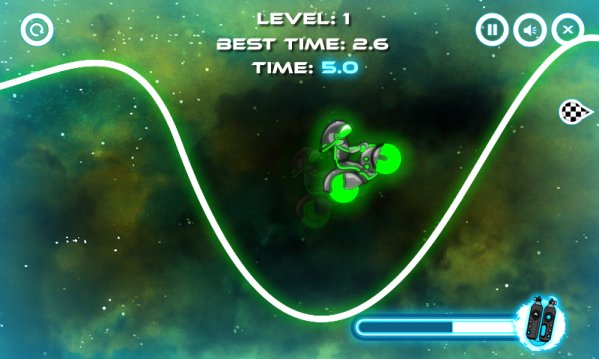
Ladies and gentlemen, start your engines! Neon Motocross will take you on a high-octane adventure as you guide your biker through a series of courses to the finish line by using the game’s touch-screen and screen-tilt controls. Each of the 180 illuminated tracks are built in their own unique manner to keep you on alert and ready at all times. Some levels might require minor nitro boosts for quick speed bursts while other tracks are deliberately designed for speed to be your ultimate downfall. This physics-based, 2-D platform game is divided into six worlds containing 30 levels each. When you first open the game, you will have access to the first 30 levels and will have to earn stars to unlock more worlds.

Neon Motocross is a fun, straightforward platform game to play if you have some time to kill. I am a little disappointed in how lackluster and bland the app is as a racing game. Its simple 2-D graphics and eerie, sci-fi soundtrack does not exactly make Neon Motocross stand out as an action-packed or adrenaline-pumping game. Nevertheless, it proves itself to be anything but a cakewalk with varying tracks that test your precision, tactics and maneuvering skills. Even though the levels are challenging, they are incredibly short and lasts a maximum of about 20 seconds from start to finish.

The app compensates for it by creating hundreds of levels for you to beat. One feature that stood out to me the most was the instant availability of every level in each unlocked world. Normally, games with this type of level layout will only give you access to one level at a time. This game differs by not only allowing you to play every level upon unlocking a new world, but also allowing you to skip levels freely without having to pay anything extra in real or virtual money.

While it is possible to do tricks like wheelies and backflips, the app doesn’t keep track of them or make them a vital factor in the overall gameplay in terms of awarding additional points or filling a bonus meter through performing a variety of stunts. The only stats shown on the HUD are stopwatch timer, level number and how far you are away from the finish line. It would be like playing Tony Hawk Pro Skater or SSX Tricky on practice mode throughout the entire game.

There is no point structure or more attribute upgrades to offer in the other than a selection of different color bikers and tanks of nitrous oxide boosts. Besides unlocking worlds and achieving three-star rankings on each level, there is little to no motivation to play this game from start to finish.

The app does allows you to earn achievements through a Google Play Games account and within the game, but lack any other incentives upon completion besides bragging rights, if any. This game would be more engaging to play if more game modes were available such as multiplayer and time attack and if a local leaderboard were added, separate from Google+.

Categories
Reviews

Matching With Friends [Android Game Review]

App Name: Matching With Friends

Developer: Zynga

Market: Google Play, iTunes

Cost: Free

Matching With Friends is the one of Zynga’s newer puzzle games where Scrabble meets Tetris. Try to create three-color matches on the board with the three tri-color tiles you are given. The more colors you link together, the more points you will earn. The double and triple-point multipliers scattered across the board and wild star tiles will also help increase your score. Use different types of bombs to blow up a square or linear radius of blocks on the board to help you to open up your options as well as to assist you as to what your next move might be.

Each game lasts for about 11 moves per player and the highest score wins. Test your skills against your Facebook friends, phone contacts, random opponents or even locally with the “Pass and Play” option. A help section and a walkthrough tutorial will give you extra tips for scoring, detailed explanations of special items such as the bombs, how you can earn more coins to save toward swapping tiles and purchasing bombs, among others.

This is another truly original game created by Zynga with an innovative concept. Besides Words With Friends, this is one of the few Zynga games where your in-game performance heavily relies on good strategy and tile placement. Prior to this, the popular game developer has been mostly known for putting modern twists to classic games through their apps such as Draw Something (Pictionary), Hanging With Friends (Hangman) and Scramble With Friends (Boggle).

It will take you a few matches to get accustom to the new format and basic strategic maneuvers so you can eventually master this game. Unlike some of Zynga revamped renditions of popular games, you have to create you own strategic plans and moves since you will be mostly unable to use any transferable skills and tactics from other games.

I don’t have any complaints about this puzzle game with its smooth, colorful and navigable user interface and a solid game premise. This game can be addicting and will keep you interested with each match bringing you a different, mind-bending puzzle every time. Matching With Friends is another example of Zynga is a top developer when it comes to creating social, stand-alone platform games. The app is free to download in the Google Play and occupies minimum space on your phone due to its 18MB size.