
Categories
Articles

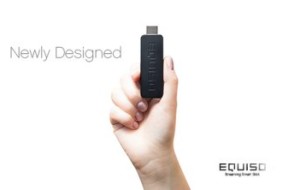
Equiso Smart TV versus Infinitec Pocket TV

Smart TV technology is all the rage, and two companies that came to prominence through their investment opportunities as presented by Kickstarter are leading the way into this exciting new tech sector.

Here’s a comparison of the Equiso Smart TV and the Infinitec Pocket TV, which are so similar it could come down to cost.

How They Connect

Both products are essentially the size of a standard USB thumb drive, and have a standard male HDMI connector designed to fit into any HDMI port. The Equiso Smart TV uses HDMI version 1.4 giving it the ability to stream 3-D programming. Pocket TV uses HDMI version 1.3 which does not allow for 3-D.

How they operate

Both iterations run on Google’s Android 4.0 operating system, known as Ice Cream Sandwich. No word on whether or not Infinitec will upgrade to version 4.1 (Jelly Bean), but Equiso is reported to be working closely with Google to ensure a smooth transition upon release of the OS upgrade.

Memory and Storage

Both devices offer an adequate amount of both memory and storage, which will make the choice one of personal preference. Equiso Smart TV comes with 512MB of memory in its basic configuration and bumps that to 1GB in the Pro model. Either comes standard with 8GB of internal storage. The Pocket TV comes standard with 1GB of memory and 4GB of internal storage.

CPU and GPU

The processing capabilities of the two devices spells the biggest differences between them. When it comes to graphics, the Pocket TV uses the excellent Mali-400MP Graphics Processor, giving viewers a truly smooth an excellent viewing experience. Equiso Smart TV went with Mali as well, choosing the 400 3-D graphic processor because of its ability to stream 3-D content.

The central processing units, however, are considerably different. Infinitec went with the 1GHz ARM Cortex A9 CPU, which has been known to overheat in small packages. Testing indicates it can only operate at 600 MHz inside such a small package to avoid the issue of overheating after a couple of hours of continuous use.

Conversely, Equiso chose the 1GHz ARM Cortex A5 CPU, which can operate at a full 1Ghz without overheating in this particular usage, which Equiso developers say will make a big difference when it comes to its Smart TV product’s ability to process complex commands.

Remote Controls

This is another area where user preference could ultimately decide which product is the right one. The Infinitec Pocket TV offers two versions, including a “wired” infrared remote as a part of the standard package, or an upgrade to a full-QWERTY keyboard wireless version. The infrared remote is very simple and offers a limited range of features.

The Equiso Smart TV offers a unique, two-sided wireless remote in all packages. On one side is a simple “gesture” remote that controls page content in much the same way as they’re controlled on smartphones and tablets. On the reverse side is a full-QWERTY keyboard when the need arises.

 Networking and Additional Features

Both versions offer wireless networking, with only slightly different configurations. The Equiso Smart TV comes standard with 802.11 N wireless radio and the Infinitec Pocket TV offer 802.11 b/g/n wifi to ensure its compatibility with the widest range of wireless protocols possible

Both devices also offer additional features. The Equiso Smart TV includes a USB 2.0 Plug n’ Play interface. The Infinitec Pocket TV includes the same USB port, plus a mini USB power port and a MicroSD slot for a maximum of 32GB of additional storage for movies, videos, music, and other content.

Price and Availability

The Equiso Smart TV will be available beginning in August 2012. It will offer its basic package for $69 then, with the Pro package due in October 2012 for $99.

The Infinitec Pocket TV will be available in October 2012. The basic version with the infrared remote control will be available at a cost of $129, with a $20 bump to $149 for the wireless version.

Regardless of which way you go, smart TV products are about to change the way we watch television by turning our HDTVs into Android-based “smart” TVs, giving us access to millions of apps for the Android operating system.

About the Author:  Justin is a sports, marketing and tech enthusiast. When not in the stands watching University of Utah football you can find him writing and blogging for DirecTV

Categories
Articles

A Guide to Android Word Processing

Word processing on a smart phone is something that is highly useful for many bloggers and webmasters, as well as a number of businessmen. The idea here is that you have a device that you carry with you constantly and that’s small enough to fit in your pocket, and you can nevertheless use it to write documents and upload articles in order to ensure that your site is constantly full of new and interesting content for your visitors.

However this is something that will only work if you are able to write quickly and effectively – is an Android phone with its small screen and its lack of physical keyboard up to the task? Happily the answer is yes, but only if you know how to get the most from your small device and if you invest in the best hardware and software.

Your Keyboard

First of all you are going to need a pretty good input if you are going to write at anything approaching the kind of speed you would enjoy on a laptop or netbook. If your Android is big enough then this can mean downloading one of the optional keyboards from the Play Store and some of these will make typing quickly much more possible.

One of the best keyboards on the Play Store for this is the Writers’ Touch Type Keyboard which takes up much more of the screen and is perfect for a large phone while in portrait. Another good solution is ‘Slide It‘ which is rather different and some people seem to love (though not me personally). Finally you might also consider ‘Thumb Keyboard‘ which splits the keyboard in half and moves it around the screen making everything you could want available for your thumbs. Choose one that works for you and stick with it.

That said you may find that none of these solutions are up to task and in this case you can instead use a portable Bluetooth keyboard to do the job for you.  These will par with your device and provide you with a number of different sized keyboards and various amounts of functionality. The key is to get a size that is portable without sacrificing the ability to type fast and preferably to touch type. Some tablets of course come with keyboards attached such as the Asus Transformer Prime, and tablet keyboards will always be a little bigger, but if you want a keyboard to use with your phone then portability is going to be key. It’s matter of finding the smallest keyboard you can that still lets you touch type. Of course then if you really want to show off with your external hardware you could invest in a small mouse (using a USB to MicroUSB port) and a wireless printer. Who needs computers anyway?

Your Word Processor

There are many Word Processor apps on the play store though only two of them are really worth mentioning at the time of writing (Writer and Text Warrior for instance are so devoid of features as to be useless for anything other than note taking). These good options are Quick Office Pro and Documents to Go. Both here will serve most purposes though they offer different advantages. While the former has more in terms of formatting options and a spell check, the latter has a wordcount which is particularly useful for what I do. Unfortunately both are quite expensive and will set you back around $20 or more, especially if you want both your word count and your spell check. The best combo is probably to use Quick Office Pro along with the standalone Word Count app.

That said you can also use various other strategies to handle your word processing such as processors that will load in your browser or apps that have other main purposes – such as the WordPress app which can make a nice word processor and particularly if you were going to upload to a blog anyway.

Or if you want to try something completely original for your word processing needs you could even install Word 5.5 using DosBox which has a spell check and a word count as well as a very lovely retro vibe (and no annoying pop up keyboard if you’re using a Bluetooth solution) or you could go one step geekier and even install Ubuntu and Libre Writer (easy using this app) as long as you have a few gigs of space free on your phone.

About this Author: Trevor Smith is a freelance writer and a blogger. He is an Android lover and advises about the use of some wonderful apps out there to make working with Android OS a lot more fun. He works for GreatGiftsForMen, an online gift shop.

Categories
Articles

HTC ONE V Review

HTC is one of the celebrated smartphone brands in the world. As a testament to its popularity, a study by Canalys revealed that in the third quarter of 2011, HTC Corp. became the largest smartphone vendor in the United States with about 24% market share, well ahead of Samsung, Apple, and Blackberry.

The HTC One Android smartphone series garnered rave reviews and helped showcase the HTC brand name to global audiences. The Taiwanese smartphone manufacturer unveiled the ‘HTC One V’ smartphone model, as a part of the famous HTC One smartphone series.

The HTC One V was officially launched on February, 2012. The One V has lots of new features when compared to its predecessor the HTC Desire S. Boasting a 3.7-inch super LCD display, the device runs on the famous Android 4.0.3 Ice Cream Sandwich operating system. The topline features of the smartphone are:

  • 5 megapixel camera with smart LED flash.
  • Runs on 1 GHz single-core Qualcomm Scorpion CPU.
  • Supports 2G and 3G networks.
  • Packed with HTC’s proprietary HTC Sense 4.0.
  • 512 MB RAM with 4GB internal storage.
  • 1500 mAh battery capacity.
  • Beats Audio™ sound enhancement.

The synopsis of the HTC One V features certainly seems to be fascinating. This incredible smartphone weighs a mere 115 grams with the battery and boasts a 800×480 (WVGA) pixel screen. The height of the phone is 4.74-inches and the width is 2.35-inches. The phone incorporates a Qualcomm Adreno 205 graphics processing unit.

As the phone is powered by Android, you can extend the functionality of the device with help of more than 450,000 apps that can be downloaded from the Google Play app store. The phone supports various audio and video formats such as aac, amr, mp3, wma, mp4, avi, and 3gp, among others. You can also record audio and video files in amr and mp4 formats.

The striking feature of this smartphone is that it comes with HTC’s proprietary HTC Sense technology. This technology is developed to suit Android and Windows powered devices. The HTC Sense is a collection of tools and advanced user interfaces developed to work in parallel with other software. A part of HTC Sense 4.0 is the HTC ImageSense, which provides a charming multimedia experience.

The phone is equipped with 5 megapixel camera, which is supported by smart LED flash, auto focus, BSI sensor, and a dedicated imaging chip. The ImageSense technology enhances the camera features with HTC Video Pic, which allows you to shoot high-definition videos, while also clicking high-resolution pictures simultaneously. While Zero shutter lag, continuous shooting, Group Portrait, Smile Capture, and Panorama are some of the other features.

The HTC One V embraces a range of connectivity options such as BlueTooth with aptX™, Wi-Fi, standard micro-USB slots, and 3.5 mm stereo audio jack. The phone boasts proximity sensors, ambient light sensors, and G-sensors.

In conclusion, the new HTC One V looks to be a prosperous addition to the famous HTC One series. For those who are on the lookout for prominent features and sleek designs, the ‘HTC One V’ is the one that will appease you.

About the Author: This article has been brought to you by MyTechHelp – a leader in providing support across various products brands and tech devices for individuals and small businesses in need of instant tech help go to this link.

Categories
Articles

Amazing Alex – Android App Review

App Name: Amazing Alex

Developer: Rovio Mobile Ltd.

Cost: Free/ $0.99 USD

Market: Google Play

Review:

From the makers of Angry Bird, Rovio, finally comes another game – the Amazing Alex. Don’t be put off by the name – even if they could have done better with the alliteration, if that was indeed what they were going for, they have still managed to put up a pretty fun game, which like Angry Birds is addictive enough to keep you playing for hours. This game has been acquired by an independent developer (Go indie!), and already it has become the top iOS game. It is also available on the Android of course, but not on Windows phone. But then, very few developers develop for Windows.

If you’ve been a player of Angry Birds however, you will see many similarities. The animation is very similar, all glossy and slick and the interface is similar too. The storyline, like Angry Birds, is pretty simplistic, but if you’re a fan of Angry Birds you will love it, because the game is designed for a relaxing, fun, no thinking experience.

In the game, you are Alex, a wonder kid who has a fantastic imagination and wants to put his many toys to use by building a domino effect or a Rube Goldberg contraption to get to the next level. You have everything from books, balloons, pens, wooden planks and about 35 object including these that you can throw around either a backyard, a classroom, a bedroom or a tree house. You have different items to throw around with each level which you do by dragging them and letting them fly in a parabolic manner – much like Angry Birds. There are stars to collect –three of them which you need to get to the next level.

There are challenges. You can’t let the ball hit a maze or other obstacles, can’t allow the balloon to hit the air of scissors so all this makes it more fun. Because it is trial and error, the game has unlimited tries for any level. There are a hundred levels, and there are various permutations to clear each level, which means if you did it in one manner the first time, you can do it in another the next time. Once you get through the classroom however, you get to unlock a fifth level called My Level where you can make your own challenges and share them with others who love the game.

This game like Angry Birds is fun for those hours when you have nothing to do. Sitting on a train, waiting in a line, idling away your time? Well, now you know how not to be bored.

About the Author: Robin Mckenzie has been writing articles related to Technology News, Gadget Reviews and How To’s. Also, he does guest posting for Buycenturylink.com, a site that offers great savings and up-to-date information on consumers broadband internet and cable. Visit centurylink.com or you can click here.

Categories
Articles

Google Nexus Tablet Finally Ready to be Released

Remember way back when Google and Asus were said to be working on a powerful yet extremely affordable tablet? It was the greatest thing ever. What’s even better? You can finally get one.

The best part about this new tablet is the price. At only $199 for a 7-inch tablet with the raved about Tegra 3 quad-core processor, 8GB of storage, a 1280 x 720 resolution screen and 1,2 megapixel front-facing camera, this tablet is a steal for anyone who has been waiting for such a thing to emerge.

Sure, the Kindle Fire was the deal of the century, but now the Google Nexus tablet is the new deal. Better yet, it’ll receive updates straight from Google. Yes, that means you won’t need to wait six months until other manufacturers lazily get around to updating your product.

Asus was behind the manufacturing of the tablet, so you know it’s quality. Its Transformer Prime that was the first tablet to release with the new Tegra 3 processor, which was a fantastic product. But not wanting to get shown up by Google, Asus will also be coming out with a cheap tablet.

Perhaps the best part of the Nexus tablet is that it will ship with the newest version of Android to date codenamed Jellybean, which is Android 4.1 in number form. Ice Cream Sandwich was perhaps the biggest update of Android in years, and Jellybean is supposed to be even better. With increased speed, responsiveness and fluidity, Jellybean is the refined version of Ice Cream Sandwich.

Here is a list of the specs for the Nexus 7:

  • Quad-core Tegra 3 processor
  • 7-inch IPS display with a 1280 x 800 resolution and 216 ppi
  • Android 4.1 Jellybean
  • 1 GB RAM
  • 8 or 16 GB of internal storage
  • 4325 mAh battery ( around eight hours of active use)

The Kindle Fire will probably drop in price to combat the Nexus tablet, but we will wait and see.

In the meantime, get your hands on one of the most anticipated tablets of the year, and also anticipate massive delays in shipping and also get ready for the tablet to be sold out everywhere for quite some time.

I warned you!

About the author: Joe Petchonka provides many different websites with the quality information that they desire, but he also teaches anyone how to creative writing tips because of how important it is. 

Categories
Articles

What can Android Jelly Bean Offer Android Users?

Jelly Bean is the latest version of the operating software from Android. Called Android 4.1, it has a score of enhanced features that go with the 4.0 infrastructure. Here are the things you might enjoy in this aptly named treat of an update.

  1. Smooth as butter- Once in a way, your tablet or phone does not react as quickly as you want it to. Project Butter is a bid by the Android team to eliminate this screen lag and increase reaction time and even make faster animation. What this means is triple buffering for better integration between the CPU and GPU, which in turn creates smoother appearances. You can use this to better your app experiences and make them work harder and faster for you. This is great news considering Google’s maiden tablet, Nexus 7 runs on Jelly Bean 4.1.
  2. Google Now- Considered to be competition to the popular Siri, in Apple’s iPhone®, this feature allows you to search by voice, giving you updated, timely information. So, whether it is train schedules or stock market updates, a restaurant close-by or a route to a holiday destination, you will be able to get instant information.
  3. Widgets reloaded- With Jelly Bean, you can refit widgets and relocate applications to fit the screen. This means more room for more widgets of immediate importance.
  4. Voice in a new tune- Which voice is not new, you now have an offline voice option. The voice recognition software fits into your phone or tablet and needs no internet connection for it to work. Available in English, there are plans to include other languages too.
  5. Better keyboard- There is better accessibility for blind users who can use Braille devices to connect to Android. Apart from this, gestures to perform preset, basic tasks are also built in. These features open a whole new world of opportunity, both to Android and to those people who were earlier unable to use the software.
  6. Camera options- Android has taken customer complaints to heart and updated the camera so that you can move to the gallery as soon as you have taken a picture, rather than take a picture and then go to the gallery as two separate actions. You can also use Bean to share pictures with other users with just a tap.
  7. Notifications- The notifications are richer and bigger in size, expandable or collapsible and you can view pictures and perform multiple actions with the new version. You can interact with Google Plus and Gmail among others.

Jelly Bean is out and has been worth the wait.

About the Author: Mark Bennett of OnlineComcast.com, a site that offers savings and current information on Comcast Internet.

Categories
Articles

Not a Fan of Instagram? Here are 5 Alternatives

Instagram-logo (Photo credit: JAMoutinho)

Instagram has moved from being popular with a small, cult-like iPhone fanbase, to becoming a media buzzword despite the fact that many people have no idea what the application does. Much of its recent popularity has to do with the fact that it released an Android app, which massively increased its userbase and brought media attention. This move was quickly followed by the company, with its staff of 13, being gobbled up by Facebook for a billion dollars.

Instagram provides a service that people love, inexplicably, some critics would say. The fact is that its features have been around for a long time and are offered by a variety of other apps.

Instagram Features that Users Love:

•    The ability to share photos using social networks
•    Filters
•    Availability on both Android phones and the iPhone
•    The ability to tag photos

Those who would rather not hop on the Instagram bandwagon, or who have already tried it and want something else, have a number of options in the websites below which offer all or some of the features above.

Hipster

This ironically-named app makes pictures look like postcards, allowing users to crop their pictures, apply postcard-like effects and also to geo-tag their pictures. The app is available for both the iPhone and Android devices.

Pixlr-o-matic

This app is a photo editor for a smartphone and is not really a community, though the pictures that are edited with it may be shared with any social app, including Instagram and the other networks on this list. As a photo-editing app, however, Pixlr-o-matic shines. Users can take a picture with their iPhone or Android device, or choose from among the ones they have stored, and apply any one of Pixlr-o-matic’s long list of frames, effects and filters.

Lightbox

The strong-points of Lightbox are that it is an excellent photo-editing and sharing app with a strong userbase that allows users share pictures using all the major social networks, Instagram included. Users can geo-tag their pictures and get a URL at Lightbox.com that they can share. Currently, the Lightbox app is only available on Android devices.

Streamzoo

Like Twitter, Streamzoo employs the use of hashtags, so that users can tag their pictures, in addition to applying filters and effects. Those who prefer to surf through the pictures of other users in Streamzoo’s community can use the hashtags to do so. The Streamzoo community also rewards users with badges and points and is described as a “photo social game” on its website. Unlike other apps, Streamzoo also allows its users up to upload videos as well as photos. The app is available for both iPhone and Android users.

Snapster

As with Pixlr-o-matic, this app is less about the community and more about the photo-editing. Users can apply a variety of frames, textures and effects to their photos and then share them via a social network account. Users do not get filters, but can save any effect they like as their own personal filter. Snapster is only available on the iPhone.

About the Author: Melissa is a writer and tech blogger and interested in various technology and internet trends. Currently working as executive editor of  Mobile Shop and trying to introduce her audience to the latest trends in technology industry.