Categories
Articles

FamilyTime Parental App Claims to Empower Parents to Fight Cyber-Crimes

It is getting harder day by day to protect kids from a multitude of online challenges. They have multiple ways to connect to the Web, 24/7 and are living amidst online and offline threats round the clock. Discussing the importance of cyber-ethic with kids isn’t the only solution to this problem. We have to protect them from harmful digital influences. There are apps like FamilyTime parental app that can help parents to ensure that their children get a safe online experience. Child Internet safety is the next step so step up and make it a bit easy.

FamilyTime app

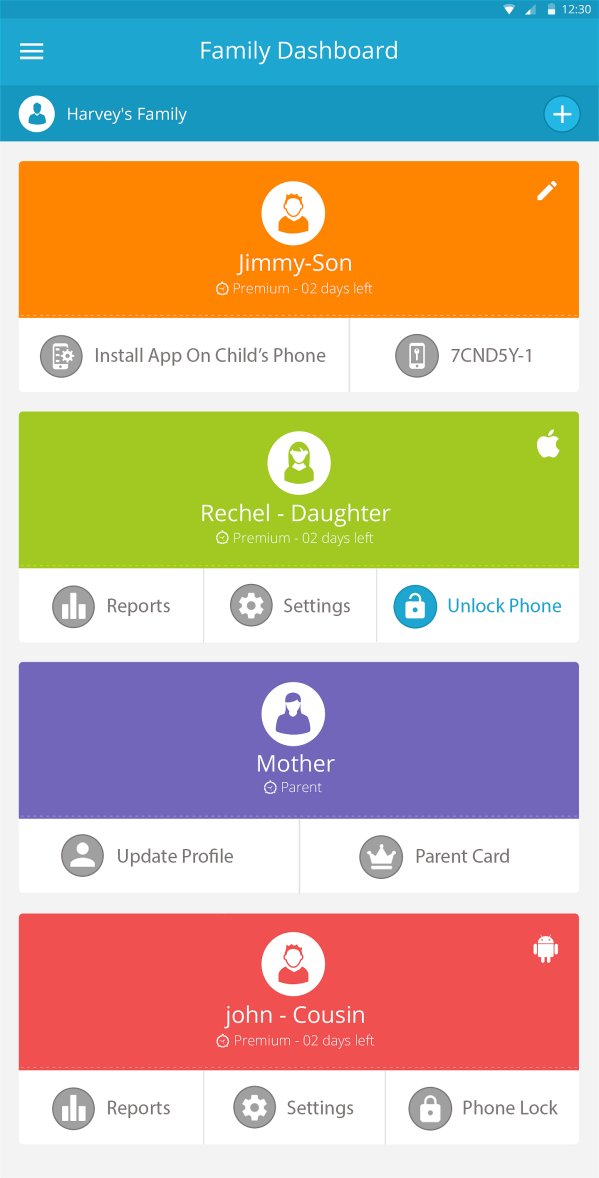
Many parental controls are available in the market, but FamilyTime is unique. Getting started is pretty easy, too. After installation, it displays your family members on a dashboard with different options to view reports, change settings and lock phone etc. It is not limited to only Web monitoring, instead, you could even use it to prevent cyber-crimes by blocking harmful apps.

FamilyTime Features

Easy-on-budget: It has different packages – free and premium. FamilyTime Premium has further three modes of paying. You can either get their monthly, quarterly or yearly subscription. In any case, you get a free 15-day free trial with all Premium features so you can get the best idea of what the app is capable of doing.

High compatibility: FamilyTime is compatible with all Android phones, iPhones and Kindle Fire Tablets.

Easy-to-use: Its user interface is very simple to use for both parents and children. It has two versions – FamilyTime – Dashboard for parents and FamilyTime for children. FamilyTime – Dashboard is the parent’s online portal where they can view and manage their child profiles and add more. FamilyTime app for children sits on children’s mobile devices and logs online activity, location details, and other phone logs and makes it accessible to the parents via FamilyTime – Dashboard.

What is worth noting is that FamilyTime does not log any data from Parent’s mobile phones or tablets. It only gives them an online dashboard to view and manage their child’s device usage and whereabouts. FamilyTime – Dashboard can also be accessed via web. Parents don’t necessarily have to install the app on their phone.

How can FamilyTime help fight cyber crimes?

FamilyTime basically puts parents on the driving seat when it comes to ensuring a safe Internet experience for their kids. Installing this app on children’s phones makes more sense as more and more kids are becoming smartphone-first Internet users.
SafeInternet

FamilyTime – Complete Web monitoring

FamilyTime covers all aspects of Internet monitoring for parents as it lets you:

  • Check their entire Web history
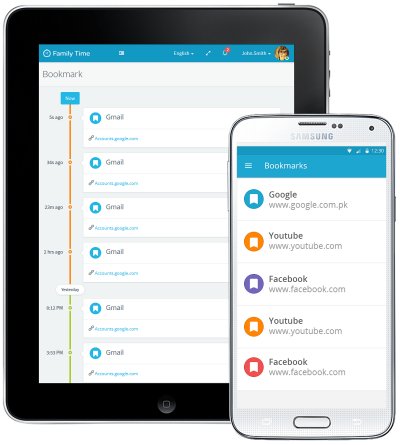
  • Check their bookmarks and favorite websites
  • Check the most visited sites
  • View how long they visited specific sites

Other Features

It’s always good to keep a safety check on your teens’ activities. FamilyTime also lets parents keep tabs on their:

Mobile monitoring features

  • Call logs
  • Phone contacts

GPS location

  • Track current location
  • Check where they have been all day long
  • View check-ins and check-outs
  • Get Geo-fencing alerts

geo-fencing

Your teens can send you:

  • Panic alerts
  • Location-based alerts
  • PickMeUp alerts

FamilyTime made Internet safer for teens

Internet safety for teens is fast becoming No. 1 concern for parents these days as teens are more vulnerable to getting influenced from any misleading or violent content. And FamilyTime parental app can help parents make it safe for them. Moreover, it’s not limited to Internet monitoring, parents can also get help from other parental controls and GPS tracking features. So, I guess that FamilyTime is a complete parenting aid tool!
familydashboard

Categories
Articles

How to Submit App Reviews – 2015 App Reviewer Survey

appsurveyscreenLate last year I participated in a survey of app reviewers-well the results are out. I definitely recommend this to all app developers and promoters. From the press release:

PR and marketing agency Big Ideas Machine have released the results from the first-ever survey of journalists that review mobile apps – and for anyone planning to launch a new app, the report makes for uncomfortable reading. With so many apps being launched every day, journalists are being inundated with pitches from PRs and developers who are trying to get their apps written about. The result? Fewer than a third of apps send to app reviewers will be covered.

The report found that that whilst journalists continued to find great new apps to write about, most were frustrated by the quality of the information and pitches they received on a daily basis. Often, pitches were poorly written, and were for apps that were not relevant to the target publication, or in some cases, were for platforms that the journalist didn’t even cover.

Some key insights include:

  • 75% of the journalists who took part in the survey said they receive as many as 20 pitches per day; 8% said they received over 50 requests a day – a staggering 13,000 requests a year!
  • When evaluating a review pitch, relevance for the publication audience was the most important factor.
  • Not enough developers and PRs are considering this issue of relevance when approaching the media, with too many using a scattergun approach in the hope of getting something to stick, which ultimately is not actually working.

2015 app reviewer survey is free to download from the Big Ideas Machine site.

chart2

I think this survey is dead-on and definitely I highly recommend this read to all app developer and PR agencies. I am going to bookmark this survey on the site and I look forward to seeing how responses change over the years.

Since this is a good time, I want to formally put in my two cents. So all app submitters here at AppReviewCentral, please take note:

  1. Read and familiarize yourself with the review site and follow their directions:
    I get so many folks submitting apps for review via my contact form and not my submission form. Fail!
  2. Manual submissions are best
    I get way too many submissions that are clearly via some online form or process, because they are all the same format and again do not follow the guidelines I request.
  3. Do not submit every app you have
    I get too many developers who submit every app they own. Pick one of two of your best apps and then see where those go. I get too many requests to come them all.
  4. Personal contact
    Someone who writes a personal email, provides press material, and promo code/apk file options in a professional matter gets more of my attention.
  5. Money
    I know every developer does not have any money but you need to set aside some money to help promote your app.

chart1

I want to thank Big Idea Machines for a great survey, that I hope helps app developers succeed.

Categories
Articles

Where Is Mobile Security Headed This Year?

The hacks of 2014 shocked us all. And while the major incidents last year weren’t mobile-related, we know that mobile malware is on the rise.

So what can we expect this year in terms of mobile security? Here are our predictions.

We’ll be seeing more government spyware

In 2014, two stories surfaced revealing parts of the world of government espionage. The first had to do with The Citizen Lab, a group out of the University of Toronto that published a research mapping the network of an “untraceable spyware” dubbed “Remote Control System,” or RCS, which was sold exclusively to governments by the Italian firm “Hacking Team.” They succeeded in identifying a number of governments that used the spyware.

The second story involved hackers who managed to leak data from the customer support server of a company called Gamma International. The UK-based company, with its subsidiary, FinFisher, provides the spyware FinSpy, a competitor of Hacking Team’s RCS, to law enforcement and government agencies. The leaked data shed light on FinFisher’s entire solutions portfolio as well as a multitude of customers who use its spyware.

With these stories in mind, we predict that this year, there will be increased use of such tools by governments worldwide—whether we hear about it or not. Here’s why:

  • First, there’s a real need for these tools. Encryption is becoming a standard these days, with numerous services using encryption by default. While some intelligence agencies may be able to crack these encryptions, most government agencies can’t. The only way for them to beat encryption is to go into the monitored person’s device itself—thus creating the need for spyware.
  • Second, even though supply exists to meet governments’ spying demands, existing spyware tools aren’t too strong. Considering The Citizen Lab was able to identify the entire proxy infrastructure of RCS, and that cases were successfully linked to FinFisher several years ago, it’s clear these “untraceable tools” can use some improving. And, when there’s a need, we can be pretty certain someone is going to try to fulfill it. Hacking Team and Gamma are not the only players in this field, and as this market continues to heat up, we’ll see an increased use of spyware by government agencies.

Mobile malware is going to become even more popular

Mobile malware has been catching up to its desktop counterpart in recent years, and we predict this trend will continue in 2015.

There are two problems that contribute to this bleak situation. First, our smartphones nowadays contain information that is even more sensitive than what we have saved on our desktops. No wonder hackers would want to get their hands on victims’ smartphones. Second, we still don’t tend to perceive our smartphones or other mobile devices with operating systems to be as vulnerable as desktops, and as a result we don’t take the required measures to protect them.

But that might change this year. If mobile attacks enter the cybersecurity limelight, as the major hacks of 2014 did last year, the public perception surrounding the vulnerability of these devices will finally awaken.

Mobile will be used for committing fraud

Ever since mobile devices became popular and every bank around the world issued its own app, attackers began experimenting with ways to commit fraud on this new platform. Whether through a dedicated app or through the bank’s website, fraudsters tested whether they could use smartphones to bypass traditional fraud detection systems. This year, fraudsters may have a new incentive to adopt mobile phones as tools of their trade.

This year, contactless mobile payment is going to increasing in popularity. Apple Pay, which was released last year and quickly gained popularity, will be rolling out to additional countries and its competitors will be heating up their engines. This will likely draw hackers to attempt to exploit these services.

So what can we do today to protect your mobile devices?

There are a number of steps we can take to protect our mobile devices and our personal data, and most involve free tools that are readily available. Here are four easy steps that can be taken today:

  1. Download a mobile anti-virus like Norton or Kaspersky.
  2. Use a password keeper like LastPass or PasswordBox to keep your passwords safe, secure and strong.
  3. Use two-factor authentication on all of your accounts to enhance security.
  4. Protect your most valuable online accounts using LogDog, which alerts you to any suspicious activity so you can take control of your account before a hacker does.

About the Author: Omri Toppol has been working with hi-tech startups for over 15 years. He is an entrepreneur with an extensive technical background and a passion for mobile.

Categories
Articles

7 Ways You’ll Get Hacked This Year

After the numerous 2014 hacks that finally shed light on the issue of cybersecurity, many are scrambling to figure out how to protect their data from getting in the hands of hackers. Few realize that, nowadays, one in four online accounts gets hacked!

The truth is, we store a lot of our personal information online in our various accounts, including our email, online storage, and social media accounts. This information, like our social security numbers, credit card information, addresses and more, is golden to cybercriminals. And, unfortunately, in this battle over our personal data, hackers are winning.

Knowing how your information may get hacked is the first step in protecting yourself. Without further ado, here are the seven most common ways you may get hacked this year.

1. Phishing sites & emails
Phishing sites are websites that look just like any legitimate site, but that were set up by hackers with the purpose of stealing your information. When you browse to any site you use often, such as Facebook or your email site, you’ll enter your login information and then see an error message. After that, the site will reload—this time, you’ll be directed to the real site, and you’ll continue browsing without realizing you’ve just given your login credentials to hackers.

Similar to phishing sites, phishing emails look like they were sent from a legitimate service provider. Without professional knowhow, discerning them from a legitimate email can be very difficult. These emails will typically prompt you to click on a link to update your credentials or provide other personal information. When you click the link, you’ll be directed to a phishing site, and the information you enter there goes directly to hackers.

2. PC and mobile malware
Malware, or malicious software, can piggyback on even the most popular software applications in order to steal your information. Download sites often screen for malware, but they don’t always catch infected files that have been uploaded by hackers. The sites that are most saturated with malware are illegal file sharing sites and sharing networks like BitTorrent. You’re almost guaranteed to download infected software if you use these sites.

3. WiFi hacks
Ever sat at a coffee shop or bookstore and connected your mobile device or laptop to their open WiFi network? If so, you’ve put yourself at high risk for hacking. Public routers have often been breached, such that anything you send over that network can easily fall into the hands of hackers.

4. Zero-day exploits
Zero-day exploits are gaps in online defense systems that are unknown to security professionals but that have been discovered by hackers. Because of how complicated computer systems are nowadays, any change could cause unintended vulnerabilities. If hackers discover a vulnerability before security professionals do, they could use it to infect your device with malware and steal your information.

5. Password lists
You can probably guess what a password list is… but in case you can’t, it’s a collection of hundreds of thousands of passwords that have been collected from breached accounts. Hackers go through these lists of common passwords in an attempt to break into your account. If your password is on one of these lists, you’re on your way to getting hacked.

6. Stolen password files
Choosing a more complex password may save you from password lists and brute force attacks, but you’re basically helpless when a master password file has been stolen from your online service provider. The sad fact is that this happens more often than we’d like, especially to poorly protected third party sites. The best protection in this scenario is simply changing all of your passwords often.

7. Social engineering
Social engineering is probably the most time-consuming method hackers use to gain access to your accounts, but that doesn’t always stop them. Social engineering involves a hacker contacting your service provider pretending to be you. With a little bit of information they may have already obtained about you, coupled with some guesswork and a plausible story, the hacker may succeed in getting the service provider to grant him access to your account.

Protect yourself from hacking
You can’t protect yourself from all types of hacking, but you can take measures right now to better secure your personal information. Head over to LogDog on the Play Store for a free anti-hacking tool that will help you protect and keep control over your most valuable accounts.

About the Author:
Omri Toppol has been working with hi-tech startups for over 15 years. He is an entrepreneur with an extensive technical background and a passion for mobile.

About LogDog:
LogDog anti-hacking and privacy tool protects the most popular online account types including Gmail, Facebook, and Dropbox by detecting unusual access activity and alerting users so they can take control of their accounts before hackers do.

Categories
Articles

Have an Idea for an App? Here’s Where to Start

If you’re interested in mobile apps and have an entrepreneurial spirit, building your own app could be an exciting endeavor. You may find the allure of creating a product based on your own idea reason enough to explore what path to take to build an app. However, the possible financial gain is also a good reason to be methodical. Organize your project by following an outline for app building success.

Outline for App Entrepreneurs

App development takes more than just a great idea. To see your project come to fruition, consider the process before getting started:

  1. Define the problem
  2. Define a solution and concept
  3. Research competition and alternatives
  4. Create a business plan
  5. Create an operations plan
  6. Plan the investment arc
  7. Design, deploy, and develop V1
  8. Execute marketing plan defined in the business plan
  9. Measure success against the goals set in the business plan

Concentrate on steps 1 through 6 when you are getting started with fleshing out your app idea.

Getting Started

You are probably close to finishing steps 1 and 2 since you already have your idea for the app. These steps require you to define your idea by establishing the problem and your solution to it in clear language. This concept is what you will discuss with potential investors and will help give you focus.

Step 3 will also be important before you present your app to investors. You need to make sure that you have researched the competition and have concluded that there are no apps too similar to yours, causing investors to hesitate.

Planning

The last of the initial phase includes the business, operation, and investment plans. It is tempting to jump to development right away, but solid planning is impressive to investors, whether they are angel investors or just friends and family at this point.

Good planning also gives you an idea of what kind of requirements you’ll test against later.

Development and Beyond

Once you’ve finished planning, you’ll be ready for development. Find an app development company who shares your vision for your app and has a focus on design and usability. Whether it’s a DYI platform like Como, a boutique app development company like Noble Applications, or even a friend, do your research before hiring a developer or deciding to do it yourself. Your app V1 is around the corner, and you’ll be well prepared for the work if you have planned ahead and followed a project outline.

Categories
Articles

How To Get The Most Out Of Boot Camps For Adobe Certification Exams

adobeexamGetting the most out of boot camps for Adobe Certification Exams means you being open to the experience. Even the term boot camp can cause trepidation in some individuals, but don’t let it throw you. Boot camps are intense learning experiences, but they will give you at least as much as you give them.

Be Ready To Learn

These Adobe boot camps are meant to teach you, so be ready to learn. The more you already know about the subject material, the easier it will be, so feel free to lay a foundation before you even get there. Also, come with a positive attitude and a willingness to learn whatever is being taught in whatever way it is being taught. The boot camp formula may be new to you, but if you are open, it will be an amazing experience.

Commit Fully To The Experience

You need to commit fully. Nothing ever works out as well as it could if you do not commit fully to it, so commit fully to the boot camp that you attend. The instructor isn’t there to prove to you that boot camps work. Instead, you are there to get all you can out of it. Be the reason why the Adobe boot camp from TestsForge worked for you.

Trust Your Instructor

Your instructor will probably have run many Adobe boot camps before, so they deserve your trust. If you wanted to learn on your own, you could have, but you chose the boot camp experience, so trust it. Have faith that the boot camp will work.

Categories
Articles

Underwater Slots Adventure: Mermaids Millions [Android App Review]

Every once in a while, I like to let it all ride! 🙂 Mermaids Millions is a very popular underwater themed video slots game that has been optimized for play by the original game developers, Microgaming. This game is one of many created by the developer that has been adapted for Android devices. If you are looking for authentic casino-style fun, then give this one a spin.

This video slots features graphic-rich reels adorned with symbols such as King Neptune, sea creatures, treasure chests and a bevy of beautiful mermaids. You can dive into this exceptional underwater themed 5 reel, 15 payline slots game at any time and the simple, yet striking interface is very easy on the eye. (Yes puns are intentional)

If you want, you can play Mermaids Millions for real money, just as you would at top casino sites like Riverbellecasino.com , or you can have fun for free. The betting range is varied enough to suit all players bankrolls with a minimum bet of  0.01 and a maximum of 75, dependent on the number of active paylines selected and the coin size. The games base jackpot is 37,500 coins but this payout can be tripled by the Free Spins feature, resulting in a maximum win amount of 112,500 coins and making Mermaids Millions a very rewarding mobile slot.  No worries on my end though, we will be sticking with the free option.

mermaidsmillions2

We found the gameplay to be simple. Players need to place their bets and choose a number of active paylines before hitting spin. When the reels come to a stop any winning combinations are highlighted across the screen, making it easy see.

Mermaids Millions also has some built-in features that can boost real money players winning potential, and the free player’s fun (that’s me).  Now you should know that the Neptune symbol acts as a wild standing in to create a winning payline; lining up 3, 4 or 5 mermaid scatter symbols triggers the Free Spins round. Here players will receive 10 free spins with a 3x multiplier, ensuring bigger wins. There is also a treasure chest bonus feature that is a pick-a-box style game and players must choose from a selection of closed chests to reveal a hidden prize.

If you enjoy slot type  games, then Mermaids Millions gives you the ability to play while on the go. I do not mind giving it a spin, just for fun.