Categories
Music Reviews

Finding Music (and more) on the Cheap – CheapCharts [App Review]

Are you a music lover? Do you enjoy saving money?  Do you have an iOS device? If you answered yes to all of these, then CheapCharts should be right for you.

Prices for music change quite a bit and it can be hard to keep up with them. Well CheapCharts does the heavy lifting for you. With this app, you can easily stay ahead of the curve and know when your favorite albums or songs are on sale.

Music is just one part of the app. It also monitors Movies, TV series, Books, and Audio books.

The app has a nice minimalist design to make it easy to keep track of your favorites.   The app also has a ton of customizations you can setup.

  • Artist Radar to keep an eye on your favorite artist.
  • The overall apps notifications can be set by music genre, Top 100 singles and album charts.
  • Within each media, there are a number of subsets you can use to search and find things
  • App works for about 13 different iTunes stores around the world.

After you have customized the app to your specifications, it is time to do some shopping!

When you are shopping and find something you like, the app will let you know the current price and if it a drop or increase in price. You can click on an item and learn more about it and go directly to the App Store to purchase it.

The app is very nicely done and does make it easy to search and keep track of prices in the App Store. The app is free and works on all iOS devices.

So if you want to save a few pennies here and there on your favorite media, give CheapCharts a try.

CheapCharts - Movie & TV Deals
  • CheapCharts - Movie & TV Deals Screenshot
  • CheapCharts - Movie & TV Deals Screenshot
  • CheapCharts - Movie & TV Deals Screenshot
  • CheapCharts - Movie & TV Deals Screenshot
  • CheapCharts - Movie & TV Deals Screenshot
  • CheapCharts - Movie & TV Deals Screenshot
  • CheapCharts - Movie & TV Deals Screenshot
  • CheapCharts - Movie & TV Deals Screenshot
  • CheapCharts - Movie & TV Deals Screenshot
  • CheapCharts - Movie & TV Deals Screenshot
  • CheapCharts - Movie & TV Deals Screenshot
  • CheapCharts - Movie & TV Deals Screenshot
  • CheapCharts - Movie & TV Deals Screenshot
  • CheapCharts - Movie & TV Deals Screenshot
  • CheapCharts - Movie & TV Deals Screenshot
Categories
Music Reviews

Share your music with Swizzle [iOS App Review]

Do you enjoy music? Want to share and discover more of it online? Then Swizzle might be the app/service for you.

Swizzle is a music based social network where users can share, discover, and upload music online. In addition to the app, there is a corresponding website users can log into to access their music. Users will use Facebook to log into the service.

The app is universal but looks best on an iPhone or iTouch. When a user logs in he will see three options: Recent, Popular, and Featured. He can use these tabs to search for music in those areas. Right now you can find a lot of foreign music in these areas. I am not big into music so I did not recognize any of  the artists.

From the top menu, you can access another set of tabs: Home, My Swizzlist, My Likes, and Search. It is here where I spent most of my time. I think most of these tabs are self explanatory.

When you search and find a song you like, you can “like” the song but you can also create a list (Swizzlist) and add it to that list, so next time you are on you can quickly retrieve it. Any list you make you can have it be public or private.  The Swizzlist is the key feature (IMHO) of the app. Creating and sharing list is what the app/service is all about.

In addition to finding songs and lists online, you can add you own music. I am curious about the legality of this all and music sharing but overall the app works well and is a neat concept.

I did searching for a  variety of different types of music such as Frank Sinatra, Talking Heads, Ok Go, to name a few and was impressed with the results. There is a lot of music to find via Swizzle.

Overall this app/service works well  and is easy to use. I think music lovers will appreciate the app. I need to mention that you can watch music videos too!

The app was not found in the store. 🙁
Categories
Music Reviews

Tapping to the Music – Musica Tap [iOS App Review]

If you enjoy music and tapping to the beat, then you will want to get a copy of Musica Tap for iOS. This is fun, family friendly game that is a  lot harder than it looks!

In the game Melomanic, a music fan will show you how to play.  If you are familiar with Guitar Hero and similar games, then you have the basic idea to this game. As a song is played, numerous notes will scroll up the screen. As the note hits the stave, you need to tap on the screen. To do well in the game (get a high score) you need to have good timing and tap the screen at the right moment.  Do not worry, there is a nicely done tutorial to show you how to do it. I had to go through the tutorial a few times!

The comes with 8 different notes such as simple, double, long, slided, shake and a few more.  Each note will require something a different tap. The tutorial will show you some of the notes but not all of them.  In addition to the different notes, the game comes with 3 difficulty settings: easy, medium, and hard. I have only played on easy and that was enough for me!

The game will give you a song to play with but the neat thing about the app is that you can use your own music. Any song you have downloaded can be used in the game. The game has a nice area where you can search and sort your music by artist or album. Playing the game with your own music is the best part.

The game takes a lot of practice and concentration. You need to keep your eyes on the screen and tap at just the right time. If you do it right, the app will let you know but if you let a note go by or do not tap it just right, you will know it. Luckily the game has a pause button so you can give your fingers a rest. I forgot to mention the screen is divided in two so you will need to tap on the appropriate side of the screen.

If you really enjoy music and what to have some fun while listening to your favorite tunes, download Musica Tap. There is a free (lite) version you can try before you buy. Rock on!


The app was not found in the store. 🙁
Categories
Music

Tunecasy [iOS]

App Name: Tunecasy [iOS]

Cost: $ 0.99 USD

Developer: Score Media

App Market: Download Page

Description:

Fully featured free music downloader for iOS!

Have you had enough of paying for costly music subscription services that limit what you can download and when you can listen to your playlists? Experience the frustration no more, and use the revolutionary “Tunecast” application to download and save videos direct from YouTube, with full access to your library even when offline! Enjoy unlimited music at your fingertips whenever you wish and create inspirational customized playlists for sharing with your friends.

“Tunecast” downloads music videos from YouTube direct to you device, there are no download limits and no hidden costs, so long as your device as the storage space you can save as much content as you wish! Enjoy the music revolution that puts the power back where it should be: firmly in the hands of music lovers.

Play your music with AirPlay to your Apple TV or AirPlay Speakers.

Categories
Music Reviews

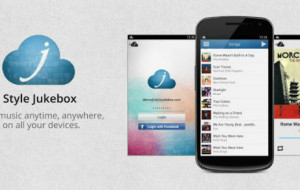
Style Jukebox for iPhone, Android

Do you love your music? Want to take it every you go? Then you might want to look into Style Jukebox.  I am not a big music guy but after a few minutes poking my nose around Style Jukebox, I was impressed. It is a true cross platform product that will allow you to access your music library from almost any device or computer.  It uses the cloud to organize and store your music.

Johnny from Style Jukebox said this to me:

“Style Jukebox differences from products like Google Music or iTunes, because it is thought as a crossplatform solution based on the music you own. It’s like Dropbox for music.

You can see Style Jukebox as a free, stripped-down alternative to iTunes that makes your music available on your iPhone anywhere OR as a simple, lightweight alternative to Google Music, with a desktop app for your PC that bridges offline and online syncing so that you can have offline access to your music + an Android app to listen your music anywhere, even offline. The biggest difference however is that we support both platform + Windows Phone and you can add all your music, no matter where is bought it from.”

When you first sign up to Style Jukebox, you get 1000 songs capacity for free.  The key word here is FREE. So if you are a big music fan, give this service a try and let us know what you think.

Unknown app
Unknown app
Developer: Unknown
Price: Free